
Solutions · Visitors
Visitor management system: know who is on site, and who has not left
Nexora Visitors is a visitor management system that pre registers each guest, sends them a QR invitation, checks them in and out at the gate, and chases the ones who never checked out.
The problem today
Why a paper visitor book fails when it matters
Visitor management sounds like an administrative nicety right up until there is an evacuation. Then it becomes the most important list in the building, and the paper book at reception turns out to have three illegible names, four people who signed in and never signed out, and no record of who they came to see.
Nexora visitor management replaces that book. A host pre registers the visitor, the visitor gets an emailed invitation with a QR code attached, and the gate checks them in and out against a real record. Visits are tied to a branch, so a company with several sites sees the right gate and the right list, and anyone who has not checked out gets chased automatically.

What goes wrong
Three gaps in a manual visitor process
Everybody is doing something manual to fill in for the fact that the two halves of visitor management, the host and reception, were never connected.
A visitor book nobody signs out of
Reception has a book, signed with varying degrees of legibility. Nobody signs out, because signing out means walking back to the desk and there is a taxi waiting.
Host and reception out of step
The host does not know their visitor has arrived until reception calls, and reception does not know the visitor is expected until they turn up.
A guess at the visitor evacuation count
The book says forty seven people signed in today. It does not say how many are still here, so the number the assembly point depends on becomes a guess.
Key features
Visitor management system features that cover the whole visit
From the moment the host expects someone to the moment they leave.
Pre registration by the host
The person expecting the visitor registers them with their name, company, purpose and expected time. Reception is no longer the bottleneck.
QR invitation by email
The visitor receives an emailed invitation with a QR code generated by the system and attached to the message.
Check in and check out
A real record of arrival and departure at the gate, so the on site list is a list rather than an estimate.
Visitor overstay reminders
Anyone who has not checked out gets chased automatically. The system notices rather than a person noticing.
Visitor photo and identity on the record
Visitor photograph and identity documents are held on the visit record instead of photocopies in a drawer.
Branch aware visitor lists
Multi site companies get the right gate, the right list and the right people, per site.
Pre registration
The host does the registering
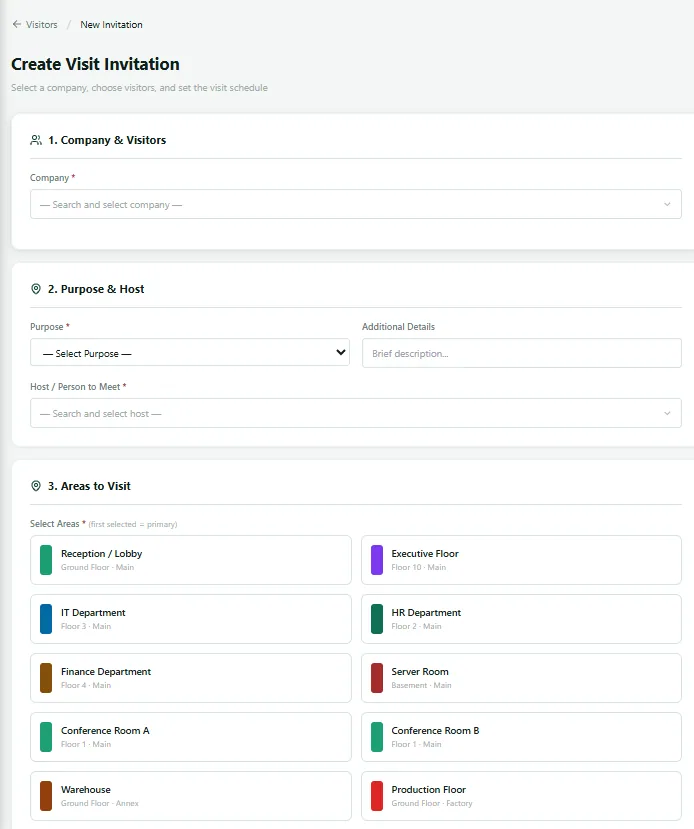
A visit starts with the person expecting it. They enter the visitor’s name, company, purpose and expected time. That single change removes most of the friction in visitor management, because the information now comes from the person who actually has it, rather than being reconstructed at a desk by someone who has never heard of the meeting.
The visitor receives an invitation by email with a QR code attached, generated by the system. They arrive knowing where to go and with something to present. Reception is no longer the place where the whole process is invented from scratch at the moment of arrival.
At the gate
Check in, and just as importantly, check out
At the gate the visitor is checked in against their record and checked out when they leave. Both movements are recorded against the branch. Check out is the half everyone skips and the half that matters. It is what converts a list of people who arrived into a list of people who are here.
One is an administrative record. The other is the thing a fire marshal is holding at the assembly point.
Reminders for any visitor who did not leave
The system runs overstay reminders on its own. A visitor still showing as on site well past their expected departure triggers a reminder, so somebody looks into it. Most of the time the answer is dull: they left through a different gate, or their meeting overran, or somebody forgot to check them out. The value is that the discrepancy surfaces the same day, while it can still be resolved, rather than being discovered during a drill when the numbers refuse to add up.

Identity and privacy
The visitor record instead of the drawer
The visitor’s photograph and identity documents are held on the visit record. That is better than a photocopy in a drawer in every way that matters: it is attached to the visit it belongs to, it is searchable, it is subject to the same access control as everything else in the system, and it does not sit in a filing cabinet in a corridor for six years because nobody knew whose job it was to shred it.
How it works
How a visitor management system runs a visit
From the moment the host expects someone to the moment they leave, with the system chasing anything that does not complete.
How a visit runs
Live view
The on site visitor list, on a live dashboard
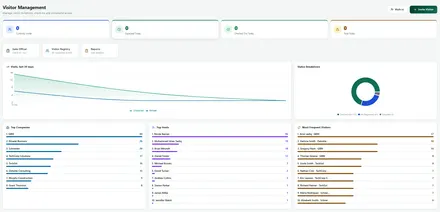
Who is here right now, current to the minute rather than to whenever the book was last legible.
Visitors dashboard
Records & reporting
What a visitor record captures, and what the manager sees
Every visit leaves a full history you can search by host, company and date.
| Record | What is captured |
|---|---|
| Visit reference | A reference number for the visit. |
| Visitor details | Visitor name, company and purpose. |
| Host and branch | The host, and the branch the visit is tied to. |
| Expected arrival | The expected arrival time entered at pre registration. |
| QR invitation | Whether the QR invitation was issued. |
| Check in and check out | Actual check in and check out times. |
| Photo and identity | Visitor photograph and identity documents, where held. |
| Overstay reminders | Overstay reminder events and the full visit history. |
| View | What it answers |
|---|---|
| On site now | Who is on site right now, by branch. |
| Expected today | Expected arrivals for the day. |
| Not checked out | Visitors who have not checked out. |
| Visit history | History by host, by company and by date. |
| Evacuation list | The list a fire marshal needs, available on a phone. |
Works with
Visitor management system alongside the rest of your site controls
Nexora Gate Keeper
Control what leaves and enters the site, with approvals and returnable item chasing, for the same gates your visitors use.
Connected
How Visitors connects to the rest of Nexora
Reception is the first impression of a site and also a security checkpoint. The Visitors module lets you handle both: guests are invited in advance with a QR code, arrive to a quick and professional check in, and leave through a recorded check out, while hosts are notified and overstays are flagged by reminder. That is a visitor management system done properly.
Visitors connects naturally with Gate Keeper, which controls vehicles and materials at the gate, and with the shared people and department records used everywhere in Nexora. The dashboard shows visits, top hosts and frequent visitors, and a complete log of who was on site and when is always available if a safety, security or audit question arises.
Getting started
Getting started with your visitor management system
From first invitation to a complete site log.
- 1
Define visitor types
Set up categories such as guest, contractor and delivery.
- 2
Pre register each visitor
Hosts invite visitors, who receive a QR code.
- 3
Check in at reception
Scan the code, confirm details and issue a badge.
- 4
Notify the host
The host knows as soon as the visitor arrives.
- 5
Visitor check out and review
Record departures and watch for overstays.
First impression
A better visitor first impression, and a safer site
Visitors judge an organisation from the moment they arrive. A guest who is expected, greeted by name and issued a badge in a minute feels welcomed. One who waits while someone finds a pen feels ignored. Pre registration with a QR code makes the first experience smooth, while giving security the information they need.
The safety benefit is equally real. If there is an evacuation or an incident, a complete and current list of who is on site is available immediately, instead of a paper book that may be out of date. Overstay reminders flag anyone who has stayed longer than expected, so unusual situations are noticed early.
Related: Visitors connect to Gate Keeper for vehicles and materials, work permits for contractors, HSE for site safety and transport for staff movement.
In practice
Visitor management system in practice
Reception, entrances and forms that work together.
Reception check in
Secure entrance
Visitor registration form
Visitor dashboard
FAQ
Visitor management system FAQs
Does the visitor need to install anything?
No. They receive an email with a QR code attached. That is the whole of their side of it.
What if a visitor turns up without being pre registered?
Walk in visitors can be handled at the gate. Pre registration is the smoother path, not the only one.
How are visitor identity documents handled?
They are held on the visit record inside the system, under the same access control as everything else, rather than photocopied and filed. Set your retention approach to match your own privacy obligations, such as the guidance from the UK Information Commissioner’s Office.
Can we make visitor photo capture mandatory?
The settings for requiring a visitor photograph and an identity scan exist in the system today, but they are not yet surfaced in the settings screens or enforced at check in. Bringing that live, along with a gate side verification step with camera capture, is our next piece of work on this module. We are telling you plainly rather than letting you assume.
Does the visitor management system work across several sites?
Yes. Visits are tied to a branch, so each site sees its own gate and its own list.
Why replace a visitor book with a visitor management system?
A visitor book shows who signed in, not who is still on site. A visitor management system pre registers guests, alerts hosts, prints badges, records safety inductions and gives you a live list of everyone inside, which matters most in an evacuation.
See the on site visitor list
We will run a full visit from invitation to check out, on your own branch structure.