
Nexora · Platform
Business operations platform: one private tenant, twelve modules
The Nexora platform is a cloud business operations platform for workplaces in Canada, the UK, the Gulf and Pakistan. Each customer gets a private tenant, their own branded login address, and data that never touches anyone else’s.
Tenant & access
A private platform for every customer
Your own address, your own module access rules, and search that never shows more than a user is allowed to open.
Your own branded Nexora address
Every customer gets their own subdomain. The login page carries your logo and your colours. A person signed in to one customer's space cannot cross into another's: it is blocked at both the browser layer and the data layer.
Nexora module access, per user
Each module can be switched on or off for an individual user, not just for a role. You control exactly who sees what.
Platform search that respects access
One search box across tickets, incidents, observations, permits and assets. Results respect your module access and record level permissions, so nobody sees something in search they couldn't open directly.
Mobile
A platform built for the field
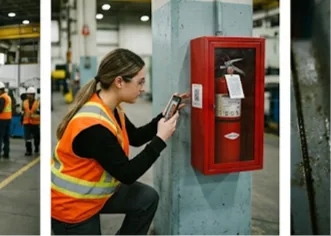
The Nexora platform runs in the browser on a phone. QR scanning uses the phone camera in the app itself, so no separate scanner app is needed.
Setup & notifications
Fast Nexora setup and notifications that run themselves
Get your records in quickly, then let the platform chase what is due.
Bulk import into the platform
Import users, assets and records from Excel or CSV, with a full validation pass first. If three rows are bad, zero records are created, and the system names exactly which three failed.
Platform notifications that run themselves
In app notifications across every module, plus email through your own mail server. Automatic reminders run in the background for permit expiry, returnable items, visitor overstays, maintenance schedules, certificate expiry and help desk escalation.
Reports & analytics
Platform reports and analytics across all modules
One dashboard pulling live counts from HSE, audits, permits, gate activity and help desk, plus a custom report builder and scheduled delivery.
Reports dashboard
Go deeper
Explore the Nexora platform
Three places to continue.
Nexora security and data →
How your data is protected, and how you'd get it back.
Nexora approvals engine →
How multi step approvals actually work.
All Nexora modules →
See every solution the Nexora platform offers.
Why a platform
What a platform gives you that separate tools cannot
It is easy to solve one problem at a time with a different tool for each: one for tickets, another for assets, a third for visitors, a fourth for permits. Each purchase makes sense on its own. Together they create a quiet tax. People need several logins, the same employee or vehicle exists in five places, reports have to be stitched together by hand, and nobody can follow one record from start to finish.
A single business operations platform removes that tax by giving every module the same foundations: the same people, the same departments, the same sites, the same assets, the same approval rules, the same search, the same notifications and the same reports. Add a module and it already knows who your staff are and what you own. Change a department name once and it changes everywhere.
That shared foundation is also why the Nexora platform can offer features that standalone tools struggle with, such as a single search box that respects permissions across every module, or a reminder engine that watches every date in the company in one place.
Every role
How Nexora feels to different people
A business operations platform succeeds only if the people using it every day find it easier than what it replaced. Nexora is designed around three kinds of user, each seeing what they need and nothing more.
Because access is controlled per user and per module, you can give a contractor one module, a department head their own department, and a senior leader the whole picture, all from the same system.
Four kinds of people, four views:
- Everyday employees raise a ticket, request a seat, book a pool car, report a hazard or check their own assets from a browser on any device, and see only their own records.
- Managers and department leads approve requests, watch their team’s work and see their department’s assets, vehicles and open items on one screen.
- Administrators configure modules, users, approval rules and categories, import data, run reports and decide who may see what, without needing a developer.
- Auditors and executives follow a record from request to completion, export evidence and read live dashboards instead of waiting for a monthly pack.
Reliability
Platform hosting, backups and the boring things that matter
Business software is judged less by its best day than by its worst. Nexora runs on secure servers with encrypted connections. Backups run automatically to a separate data centre region, with a tested restore procedure and configurable retention, so a failure in one place does not become a loss of your records.
Each customer is a private tenant, separated from every other at the database layer, and every user completes two factor authentication. If your organisation uses Microsoft accounts, Microsoft Entra single sign on is supported and users still complete the second factor. You can send email from your own domain through your own mail server, so notifications look like they come from you.
And because your data should always be yours, a full export of every record and every uploaded document is a built in feature, available as a single package whenever you ask. You can read more on our security and data page.
Fits your world
Your branding on the Nexora platform
The Nexora platform adapts to how your organisation presents itself. Your logo and colours appear on the login page and throughout the platform, and you use your own web address, so staff and visitors see your brand rather than ours. Locations, branches, departments, categories and approval rules are all configured to match how you really work.
Existing information comes with you. Users, assets and records are imported from Excel or CSV after a full validation pass, so you start with real data rather than an empty system. Where you need Nexora to exchange data with SAP, a CRM or another system, our integration team connects them, and our software licensing team can supply the Microsoft 365 or other licences around it.
Rollout
How a Nexora rollout usually goes
- 1
Agree the starting modules
We pick the first one or two modules that solve your most pressing problem.
- 2
Set up your private tenant
Your private tenant, branding, sites, departments, users and access rules.
- 3
Import data into the platform
Excel or CSV lists validated in full before anything is created.
- 4
Train your people on Nexora
Short sessions for administrators and for everyday users.
- 5
Go live and add modules
Start using it straight away, and switch on more modules whenever you are ready.
Growing with you
A platform that grows as you do
Companies change. A single site becomes three, a team of twenty becomes two hundred, and a process that began on paper becomes a regulated one. Software that cannot follow becomes the next thing to replace, which is expensive and disruptive.
This business operations platform is designed to grow with you. You add modules when you are ready, add sites and departments as you expand, and give new people exactly the access they need. Data stays in one place, so the history you built in year one is still there in year five. And because every customer is a private tenant with a full export always available, growing with us never means being trapped by us.
Questions to ask
Questions to ask when comparing a business operations platform
If you are weighing the Nexora platform against other options, these are the questions we would ask in your position. A good business operations platform answers all of them clearly.
We are glad to answer each of them in a demo, using your own situation rather than a script.
Six questions worth asking:
- Do all modules share one set of people, sites and assets, or are they separate products joined together?
- Can I turn modules on one at a time, and what does that cost?
- Is each customer a private tenant, and how is that enforced?
- Can I import my existing data, and is it validated before it is saved?
- Can I export everything, including documents, whenever I want?
- Who supports it, how quickly, and how do I reach them?
Honest view
Nexora business operations platform pros and cons
What it does best, and where another tool may suit you better.
Pros of Nexora business operations platform
- Help desk, assets, maintenance, fleet, visitors, gate, permits, safety, audits, training, transport, cafeteria and approvals all share one set of people, sites, departments and assets.
- Each customer is a private tenant with its own branded login address, separated from every other customer at the database layer.
- Module access is set per user, not only per role, and one search box across modules never shows a record a user could not open directly.
- Bulk import from Excel or CSV is validated in full first, so a file with bad rows creates nothing and names the rows that failed.
- One reminder engine watches permit expiry, returnable items, visitor overstays, maintenance schedules, certificate expiry and help desk escalation.
- Two factor authentication for every user, Microsoft Entra single sign on, automatic backups to a separate region and a full export of every record and document.
- Setup and data import done for you by ApexGenTech, with support in Canada, the UK, the Gulf and Pakistan.
Cons of Nexora business operations platform
- No accounting, CRM, payroll or sales apps; Zoho One and Odoo cover those departments as well.
- No do it yourself app builder like Zoho Creator, Odoo Studio or ServiceNow App Engine; new apps and integrations are built by our development team.
- No public price list and no permanent free plan; you get a written quote based on users and modules.
- A younger product with a smaller public review base than Zoho, Odoo or ServiceNow.
The Nexora business operations platform suits organisations that want safety, assets, people and site work in one private system, set up for them, without hiring a partner to configure a large suite. If you want finance, CRM and HR from one vendor, Zoho One or Odoo fits better, and if you are a large enterprise building many custom workflows across IT and HR, ServiceNow fits better.
Comparison
Business operations platform compared: Nexora vs Zoho One, Odoo, ServiceNow and separate point tools
How the Nexora business operations platform compares with the options buyers weigh most often: Zoho One, Odoo, ServiceNow, a set of separate point tools bought one job at a time, and Property Automate, a regional vendor whose WorkplaceGOTO product covers permits, gate passes, visitors, maintenance and assets in the Gulf. Pricing models are described rather than quoted, because vendors change their prices often.
| What matters | Nexora | Zoho One | Odoo | ServiceNow | Separate point tools | Property Automate |
|---|---|---|---|---|---|---|
| Main focus | Daily operations for safety, assets, people and sites on one platform | A suite of more than 45 apps for sales, marketing, service, finance, HR and operations | Open source business apps, from CRM and accounting to inventory and maintenance | Enterprise workflows for IT, HR, customer service and other departments on one AI platform | One tool per job, such as tickets, assets or visitors | Workplace, facility, visitor, lease and property management |
| Permits, gate, visitors, safety and fleet | Built in Nexora modules | No visitor, fleet or permit apps listed | Maintenance and fleet apps; other jobs through Studio or partner apps | Built as custom workflows on the platform | A separate product for each, with separate logins | Work permits, gate passes, visitors, maintenance and asset custody |
| Finance, CRM and payroll | Not covered | Books, Expense, CRM and People apps | Accounting, CRM and Employees apps | Sold as separate products | More separate products | PropGOTO Books accounting, claims and recruitment to exit |
| Build your own apps | Configured by administrators; new apps built by our team | Zoho Creator low code apps | Odoo Studio on the Custom plan | App Engine Studio low code apps | Depends on each tool | AI agents for back office work |
| Same records across every module | Yes, one set of people, sites, assets and approval rules | One suite; Zoho Flow connects apps | One database across installed apps | One data model across products | No, the same employee lives in several systems | Not described |
| Pricing model and free option | Quote per company by module; free demo | Per employee, licence needed for all employees; 30 day free trial | One app free with unlimited users; paid plans per user per month | Custom quote for Foundation, Advanced and Prime packages | Each tool priced on its own | SaaS subscription through sales |
| Hosting | Cloud, private tenant, backups to a separate region | Zoho cloud | Odoo Online, Odoo.sh or self hosted on the Custom plan | ServiceNow cloud | Depends on each tool | Hosted in the region you choose |
| Setup | Done for you, with users, assets and records imported and validated | Self service with free technical help; implementation from Zoho or partners | Not included in plans; Success Packs or an Odoo partner | Custom demo and quote through sales | Each tool set up separately | Through the vendor |
| Local support in Canada, the UK, the Gulf and Pakistan | Yes, direct from ApexGenTech | Zoho or its partner network | Odoo or a local partner | ServiceNow or its partners | One vendor per tool | Offices in Riyadh, Dubai, Amman, Chennai, Manila, Kuala Lumpur and Texas |
Based on each vendor’s published features in November 2026. ApexGenTech builds Nexora. Check current plans on each vendor’s website before buying.
Nexora vs Zoho One
Choose Nexora when your problem is safety, permits, gate, visitors, fleet and assets, and you want it set up for you. Choose Zoho One when you want sales, marketing, finance and HR apps from one vendor and are happy to licence every employee.
Nexora vs Odoo
Choose Nexora when you want operations modules that work on day one without a partner project. Choose Odoo when you want accounting, inventory and CRM in one database, a free single app plan or the option to host it yourself.
Nexora vs ServiceNow
Choose Nexora when you are a growing organisation that needs safety, assets and site work running in weeks. Choose ServiceNow when you are a large enterprise with a platform team building many IT, HR and customer workflows.
Nexora vs separate point tools
Choose Nexora when the same people and assets already live in five systems and reports are stitched together by hand. Stay with one point tool when you only have one job to solve and expect no other.
Nexora vs Property Automate
Choose Nexora when you want help desk, safety, audits, training and transport beside permits and visitors, with support in Canada and the UK as well as the Gulf and Pakistan. Choose Property Automate when you run property, leasing or a large facility and need Arabic reports and accounting in the same system.
Related: Go deeper on security and data ownership, the approvals engine, every Nexora module or how licensing and pricing work, or book a demo to see it with your own data.
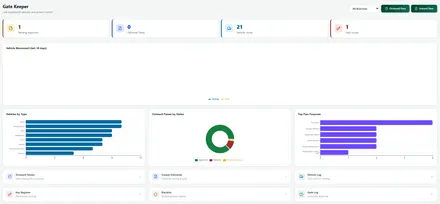
Screens
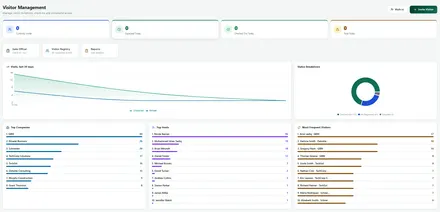
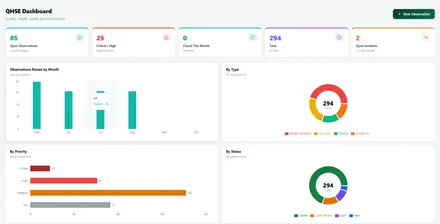
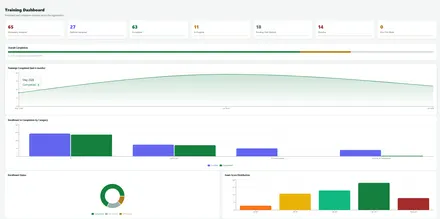
One business operations platform, many modules
The same sign in, approvals and reports across every module.
FAQ
Business operations platform FAQs
What does a private tenant mean for our data?
Each customer gets their own private space and their own branded login address, and data never touches anyone else's. A person signed in to one customer's space cannot cross into another's.
Can we control which modules each person sees?
Yes. Each module can be switched on or off for an individual user, not just for a role.
Does Nexora work on a phone?
Yes. Nexora runs in the browser on a phone, and QR scanning uses the phone camera in the app itself, so no separate scanner app is needed.
What if rows in a Nexora bulk import are wrong?
The system runs a full validation pass first. If three rows are bad, zero records are created, and the system names exactly which three failed.
Can Nexora use our own email domain?
Yes. You can connect your own mail server so notifications are sent from your domain, with a test and verification step.
Does the Nexora platform support single sign on?
If you use Microsoft accounts, Microsoft Entra single sign on is supported, and single sign on users still complete two factor authentication.
What happens to platform data if a server fails?
Backups run automatically to a separate data centre region with a tested restore procedure and configurable retention, so your records can be restored.
What is a business operations platform?
A business operations platform is one system that runs many kinds of daily work on shared foundations: one login, one set of people and sites, one approval engine and one place for reports. Nexora is a business operations platform with 12 modules you switch on as you need them.
How does the Nexora business operations platform compare with Zoho One?
Zoho One is a broad suite for sales, marketing, finance and HR, licensed per employee for every employee. Nexora focuses on operations: help desk, assets, maintenance, fleet, visitors, permits and safety on one private tenant, set up and imported for you. Many companies use both, with Zoho for finance and sales and Nexora for daily operations.
What are the pros and cons of the Nexora business operations platform?
The pros are one set of people, sites and assets across every module, a private tenant, per user module access, validated imports, one reminder engine and setup done for you. The cons are no accounting or CRM apps, no do it yourself app builder, no public price list and a smaller review base than the biggest suites.
See the business operations platform running
A short, no pressure walkthrough with our team.