
Solutions · Audits
Audit management software: findings you cannot close with an empty box
Audit management software to plan audits against your own standards, raise non conformances, attach the evidence, and close each one only when a root cause and a corrective action have actually been written.
The problem today
Why audit findings get closed with “done”
An audit is only worth running if the findings it produces get closed properly, and that is the real job of audit management. That is where most audit processes quietly fail: the findings go into a spreadsheet owned by one person, and a few months later it shows everything closed, with a column of one word entries like “fixed” and “done”.
No root cause, no corrective action, no evidence, no verification that the fix worked. A year later the same finding is raised again in the same area, and nobody notices it is the same finding.
Then there is the evidence problem. The auditor’s photographs are on somebody’s phone, the new procedure is in a folder, and the proof it was implemented is in a mailbox. None of it is attached to the finding, so demonstrating any of it means an afternoon of assembly.
Key features
Audit management software built around proper closure
Nexora Audits is built so that empty closure cannot happen. A non conformance cannot be closed until a root cause and a corrective action are written in, and that rule is enforced both on the screen and on the server.
Audit against your own standards
Keep a configurable list of the standards you work to, and pick which ones each audit covers.
A real audit lifecycle
Scheduled, in progress, completed, closed. Planned work and finished work are visibly different things.
Findings classified properly
Every non conformance is raised as major, minor or observation, so the severity mix is readable at a glance.
Evidence on the audit finding
Photographs and documents attach to each non conformance and stay attached through closure.
Audit closure that cannot be faked
No non conformance closes without a root cause and a corrective action. Enforced on the screen and again on the server.
Open and overdue findings in view
The dashboard shows open and overdue non conformance counts, so nothing sits quietly past its date.
Standards
Your ISO and audit standards, kept as a list
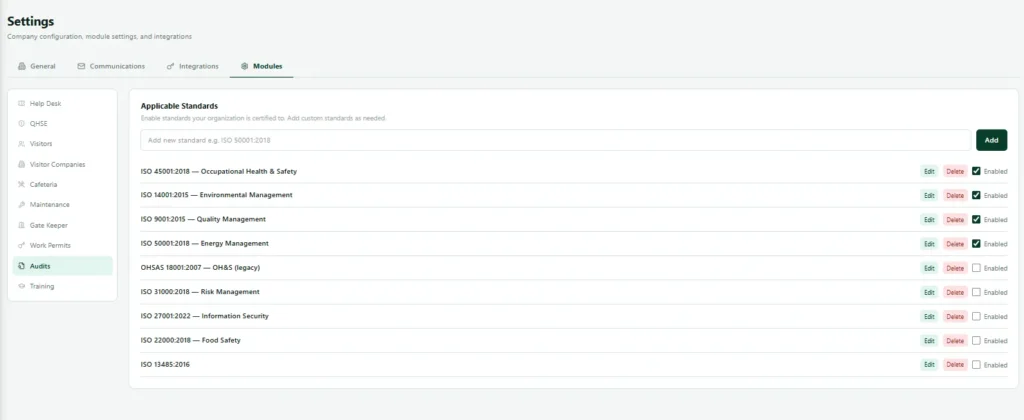
Nexora audit management holds a configurable list of the standards your business works to, whether that is quality under ISO 9001, environmental, occupational health and safety, or something specific to your industry or your customers. When you create an audit you pick which standards it covers.
Standards can be added, renamed and switched off when they stop being current. They are never deleted, and that is on purpose. An audit run three years ago against a standard you no longer use is still a real audit, and deleting the standard would quietly damage history.
The audit itself
How the audit lifecycle keeps planned and finished work apart
An audit carries its scope, its date, its lead auditor, its department and its standards. It moves through four states, each meaning something distinct.
Audit scheduled
Coming up. A manager looking at the audit plan can see what is coming.
Audit in progress
Happening now.
Audit completed
The audit work is done. Plenty of audits sit completed for months while their findings are worked.
Audit closed
Everything that came out of the audit has been dealt with. It is fully wrapped up.
Non conformances
Each non conformance classified and evidenced
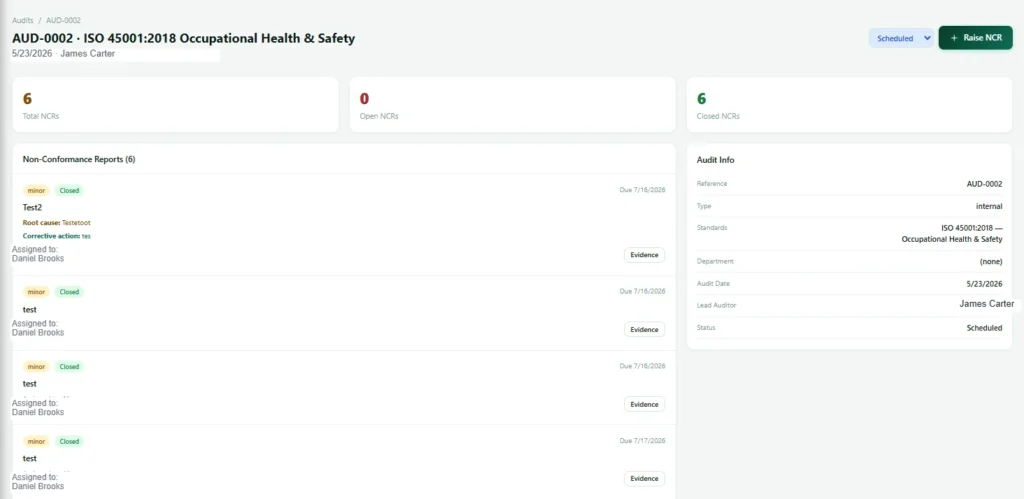
Findings are raised against the audit as non conformances, classified as major, minor or observation. Each one takes evidence: photographs, documents, whatever was gathered at the time.
That evidence sits on the finding and stays there through closure, so demonstrating what was found and what was done about it is one record rather than an assembly job. Classification is what makes a year of audits readable. Twelve minors and one major is a different year from thirteen majors, and that difference should be visible without reading every finding.
The closure rule
The audit closure rule that makes history worth having
A non conformance cannot be closed without a root cause and a corrective action. The screen will not let you, and if anything tries to go around the screen the server refuses it as well. It is the one that makes the difference between an audit history that is useful and one that is decorative.
It costs the person closing a finding an extra two minutes of actual thought. In exchange, when the same problem shows up in the same area next year, there is a written record of what everyone believed caused it last time and what they did about it.
One honest note. The rule applies to findings closed from the point it is switched on. Findings closed before that, in whatever system you were using, are not retrospectively improved. A rule fixes new data, never old.

How it works
How an audit and its findings move
Two connected flows. The audit runs through its own lifecycle, and each finding it raises runs through its own.
Flow A: the audit
Flow B: a non conformance (raised during Flow A, stage 2)
Live dashboard
An audit dashboard with open and overdue findings
Open and overdue counts derived live from the findings.
Audits dashboard
What gets recorded
What audit management software records for each audit
| Record | What is captured |
|---|---|
| Audit | Audit reference, scope, date, lead auditor, department and the standards covered. |
| Audit status | Every status change through scheduled, in progress, completed and closed. |
| Non conformance | Classification (major, minor or observation), description and evidence files. |
| Closure | Root cause, corrective action and closure history. |
| Open and overdue counts | Derived live from the findings. |
What the manager sees
What the audit manager sees at a glance
| View | What the manager sees |
|---|---|
| Audit plan | The audit plan for the year and where each audit has got to. |
| Open findings | Open non conformance counts and how many are overdue. |
| Classification mix | The severity of what is being found, visible without reading everything. |
Works with
Audit management software that works with the rest of Nexora
Nexora HSE
Observations, incidents and inspections, sharing one location structure and evidence trail.
Nexora Work Permits
Area aware approval, and permits that expire on their own.
Nexora Training & LMS
Courses, exams, learning paths and certificates with public verification.
Connected
How Audits connects to the rest of Nexora
Audit management software is most useful when what audits find actually gets fixed. In Nexora, Audits shares its people, locations and asset register with every other module, so a finding is never an isolated line in a report. It can point at the same asset or area that appears in inspections, maintenance jobs and permits, and everyone sees the same record.
That shared foundation also helps when it is time to prove something. An auditor, a customer or a regulator can follow a finding from the day it was raised, through the root cause and corrective action, to the day it was closed, without anyone assembling evidence from separate files. Reports and dashboards draw on the same live records, so the numbers you present are the numbers in the system.
Getting started
Getting started with audits
A simple path from your first audit to a working programme.
- 1
Choose your ISO standards
Set up the standards you audit against, such as ISO 9001 or ISO 45001.
- 2
Plan the audit programme
Schedule audits by site and area, and assign auditors.
- 3
Run the audit
Record findings with evidence on a phone or tablet.
- 4
Close each non conformance
Require a root cause and a corrective action before a finding can close.
- 5
Review audit findings
Use live dashboards to see open findings and trends.
A better audit
What makes an audit programme actually improve things
In audit management, the value of an audit is not the report, it is what changes afterwards. Programmes that improve things tend to share a few habits: they audit against clear standards, they record evidence rather than opinions, they require a real root cause for each finding, and they follow corrective actions until they are done.
Nexora audit management is built around those habits. Findings close only with a root cause and a corrective action written in, evidence is attached to the record, and dashboards show open findings by standard, so management can see whether the programme is working and where attention is needed. For information security audits against ISO 27001, our security audit team uses the same discipline.
Honest view
Nexora audit management software pros and cons
What it does best, and where another tool may suit you better.
Pros of Nexora audit management software
- A closure rule that refuses to close any non conformance without a root cause and a corrective action, checked on the screen and again on the server.
- Your own list of standards, such as ISO 9001 or ISO 45001, picked per audit; old standards are switched off, never deleted, so audit history stays intact.
- A clear audit lifecycle of scheduled, in progress, completed and closed, so planned work and finished work never blur together.
- Every finding classified as major, minor or observation, so the severity mix of a year of audits is readable at a glance.
- Photographs and documents attached to each finding and kept there through closure, so the evidence is one record, not an assembly job.
- A live dashboard of open and overdue findings, worked out from the findings themselves.
- Same platform as HSE, permits, training, maintenance, assets and help desk, with setup done for you and support in Canada, the UK, the Gulf and Pakistan.
Cons of Nexora audit management software
- No checklist builder or ready made audit templates yet, and you cannot attach the standard document and a checklist to an audit today.
- No separate corrective action lifecycle with named owners, due dates and effectiveness checks; it is on our roadmap.
- No AI assistant, which Mitti and Cority now build into their platforms.
- No public price list and no permanent free plan; you get a written quote based on users, sites and modules.
- A younger product with a smaller public review base than the best known EHS and quality names.
Nexora suits companies that want internal and site audits, findings and closure on the same platform as their incidents, permits, training, assets and maintenance, with setup and support from one team. If you need scored checklist templates for many daily inspections, SafetyCulture fits better, and Intelex or Cority suit large enterprises that want full CAPA and quality programmes in one EHSQ suite.
Comparison
Audit management software compared: Nexora vs SafetyCulture, Intelex, Cority and spreadsheets
How the Nexora audit management software compares with the tools quality and HSE managers shortlist most often, plus SafetyQube, a UK based safety platform rated by buyers in the UAE. SafetyCulture now trades as Mitti. Pricing models are described rather than quoted, because vendors change their prices often.
| What matters | Nexora Audits | SafetyCulture (Mitti) | Intelex | Cority | Spreadsheets | SafetyQube |
|---|---|---|---|---|---|---|
| Main focus | Audits against your own standards, with findings that cannot close empty, on a platform for every department | Frontline operations: inspections, checklists, issues, training and assets | Audit management as one application in an enterprise EHS and quality suite | Audits and inspections inside the CorityOne EHS and quality platform | A shared file owned by one person | Health and safety hub with inspections, audits and actions |
| Checklists and templates | Audit against your own list of standards; no checklist builder yet | Digital inspection templates: up to 5 active on the free plan, unlimited on paid plans | Scheduling, tracking and data collection for unlimited internal or external audits | Audits, CAPA and document control connected in one platform | A copied tab for every audit | As many checklists as you need, with QR code forms |
| Findings and evidence | Major, minor or observation, with photographs and documents kept on each finding | Observation and issue reporting | Not described on its audit page | Audit ready records across many sites | A free text column; photos stay on somebody’s phone | Live updates on inspections and actions |
| Closure control | No closure without a root cause and a corrective action, enforced on the screen and the server | Task management and approval workflows | Corrective action reporting as a separate quality application | Audits linked to CAPA workflows | Anyone can type “done” | Actions closed out from the mobile app |
| Corrective actions with owners and due dates | Corrective action recorded on the finding; a separate action lifecycle with owners and due dates is on our roadmap | Task management on paid plans | Corrective action reporting application | CAPA connected to audits and document control | Manual follow up by email | Safety tasks tracked through to close |
| Audits from the field | Findings and evidence recorded on a phone or tablet | Mobile app | Apps that work offline and sync later | myCority Mobile EHS app | Notes typed up after the walk | iOS and Android apps |
| Reports and AI | Live dashboard of open and overdue findings; no AI assistant | AI assistant, with reports in PDF, Word, Excel and web on paid plans | Audit reporting | Reporting and analytics, plus Cortex AI | Charts built by hand | Dashboards and reports shared in one click |
| Same platform runs help desk, assets, maintenance, fleet, visitors and permits | Yes, as Nexora modules | Assets and maintenance; no help desk or visitors described | EHS, quality and risk applications | EHS, quality and sustainability applications | No | Safety modules |
| Pricing model and free option | Quote per company by module; free demo on your own sites | Free plan for up to 10 seats, per seat plans, enterprise quote or per site pricing | Quote on request, with a free trial and demo | Demo and quote through sales | Free to start, paid for in hours of manual work | Unlimited users with every module included; free trial |
| Setup and local support in Canada, the UK, the Gulf and Pakistan | Setup done for you, with support direct from ApexGenTech in all four regions | Self service sign up; support level depends on plan | Through the vendor | Through the vendor | None | Office in London |
Based on each vendor’s published features in November 2026. ApexGenTech builds Nexora. Check current plans on each vendor’s website before buying.
Nexora vs SafetyCulture
Choose Nexora when you want audit findings that cannot close without a root cause, on the same platform as incidents, permits and maintenance, with setup done for you. Choose SafetyCulture (now Mitti) when you want a free plan and ready made checklist templates for frequent inspections.
Nexora vs Intelex
Choose Nexora when you want a clear audit and findings record next to your assets, permits and help desk, supported in your region. Choose Intelex when you need audits, corrective action reporting and quality management as separate applications in one enterprise suite.
Nexora vs Cority
Choose Nexora when you want one team in Canada, the UK, the Gulf or Pakistan to set up and support your audit programme. Choose Cority when a large enterprise needs audits tied to CAPA, document control and sustainability reporting with built in AI.
Nexora vs spreadsheets
Choose Nexora when you need proof that every finding was closed with a real root cause and its evidence. Spreadsheets only make sense for a handful of audits a year with no customer or certification pressure.
Nexora vs SafetyQube
Choose Nexora when you want audits plus help desk, assets, fleet and visitors on one platform, with support in the Gulf and Pakistan. Choose SafetyQube when you want a UK safety tool with unlimited users, QR code checklists and every safety module included.
Related: Audit findings connect to HSE inspections, maintenance work orders, training actions and the approvals engine; see the platform for reports.
FAQ
Audit management software FAQs
Is Nexora suitable as internal audit software?
Yes. Nexora Audits is internal audit software for planning audits, raising findings with evidence from a phone or tablet, and closing each one only when a root cause and a corrective action are written in.
Which standards does the audit management software support?
You keep your own list and pick which ones each audit covers, so it fits whatever standards your business, your industry or your customers work to.
Can we delete an audit standard we no longer use?
You can switch it off so it stops appearing on new audits, but it is never deleted. Deleting it would damage the history of audits that were genuinely run against it.
Can an audit finding really not be closed without a root cause?
Correct. The screen refuses it and the server refuses it independently, so it cannot be bypassed.
Does the audit management software track corrective actions with owners and due dates?
The corrective action is recorded on the finding and is mandatory for closure. A separate corrective action lifecycle with named owners, due dates and effectiveness verification is on our roadmap, not in the product today.
Can we attach the ISO standard document and a checklist?
Not yet. It is on the list of things customers have asked for and we are not going to pretend otherwise.
Why use audit management software instead of spreadsheets?
Spreadsheets record findings but rarely make anyone close them. Audit management software assigns each finding to an owner with a due date, sends reminders, needs evidence before closure and shows managers what is overdue. That is the difference between finding problems and fixing them.
How does Nexora audit management software compare with SafetyCulture?
SafetyCulture, now called Mitti, is an inspection and checklist app with templates, task management and a free plan for small teams. Nexora audit management software is built around the finding itself: audits against your own standards, findings classified as major, minor or observation, evidence kept on the record, and a closure rule that needs a root cause and a corrective action, on the same platform as your incidents, permits, assets and maintenance, with setup done for you.
What are the pros and cons of Nexora audit management software?
Its strengths are the closure rule, your own list of standards, a clear audit lifecycle, classified findings with evidence and a live dashboard of open and overdue findings. Its limits are no checklist builder yet, no separate corrective action lifecycle with owners and due dates, no AI assistant, quote based pricing and no permanent free plan.
See an audit finding refuse to close
It takes about ten seconds and it usually explains the whole product better than we can.