
Platform · Approvals Engine
Approval workflow software with a full history behind every decision
Nexora’s approval workflow software is one approval engine that serves multiple document types, currently outward passes, inward passes and work permits. Every approval workflow runs the same way and keeps a history nobody can quietly edit.
How it is configured
How the approval workflow software is configured
Approvals that are real: set up around your branches and your people, not one fixed rule for the whole company.
Approval chains per branch and document type
Approval chains are configured per branch and per document type, not a single fixed rule for the whole company.
Approval by fixed people or dynamic roles
Approvers can be a fixed person, or a dynamic role such as “the department manager of whoever raised it” or “the manager of the area the work is in.”
Every approval snapshotted
Every approval stores a snapshot of the rules as they were at the time, so the record shows exactly what applied when the decision was made.
Traceability
An approval history that yesterday's rules can't rewrite
Every approval stores a snapshot of the rules as they were at the time. Changing the approval workflow tomorrow never rewrites yesterday’s history: the record shows exactly what applied when the decision was made.
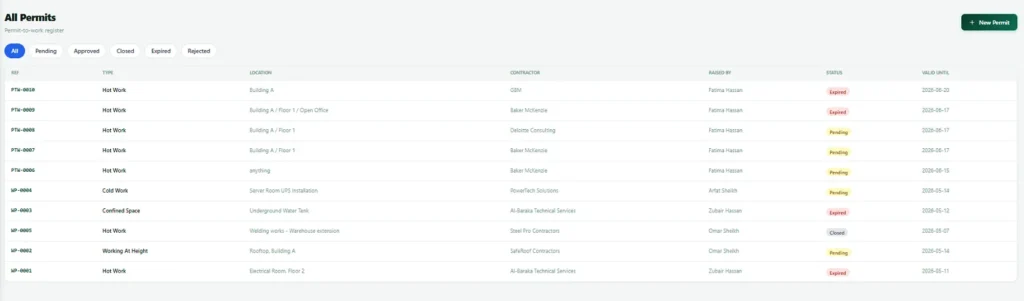
See it in action
How an approval chain runs
The same engine drives work permits and gate passes.
Work permit approval chain
Gate pass approval chain
Document types
Where the approval engine is used
One engine, three document types today.
| Document type | Module |
|---|---|
| Outward pass | Gate Keeper |
| Inward pass | Gate Keeper |
| Work permit | Work Permits |
Works with
Approvals across the Nexora platform
Work Permits →
Area aware multi stage permit approval.
Gate Keeper approvals →
Control what leaves and enters the site, with approvals.
Nexora security and data →
How your data is protected, and how you'd get it back.
The basics
What an approval workflow is and why it matters
An approval workflow is simply the path a request takes before it is allowed to happen. A contractor wants to start hot work. A truck wants to leave the site with equipment. A visitor needs access to a restricted area. In each case someone with authority must say yes, sometimes several people in a set order, and the decision must be recorded so that it can be explained later.
On paper or by email, that process is fragile. Requests get lost in inboxes, approvers are on leave, nobody can tell which stage a request has reached, and when an auditor or insurer asks who approved something and why, the answer takes days to piece together. Good approval workflow software removes all of that. The request goes to the right person automatically, everyone can see where it is, and the history is complete and cannot be quietly edited.
Nexora’s approvals engine was built for exactly this. It is a single engine behind outward passes, inward passes and work permits, so every module that needs an approval workflow behaves the same way and is configured the same way.
Who approves
Approval by fixed approvers and dynamic roles
Real organisations do not have one approver for everything. Who must sign depends on where the work is, who asked and what kind of document it is. Nexora lets you describe those rules in your approval workflow instead of working around them.
When a person changes role or leaves, a dynamic rule keeps working without anyone editing hundreds of requests, because it finds the right person at the moment the request is made.
Five patterns teams use:
- A fixed person: the plant manager always approves hot work at this site.
- A dynamic role by requester: the department manager of whoever raised the request.
- A dynamic role by place: the manager of the area where the work will happen.
- Several stages in order: the area manager first, then safety, then the site head for high risk work.
- Different chains per branch: a smaller site with a shorter chain than the head office.
Evidence
Approval workflow software that stands up to an audit
Every approval records who decided, when, at which stage and with what comment. Nothing is overwritten, so the record shows the real sequence of events.
The most important feature is the snapshot. Each approval stores the rules as they were when the decision was made. If you change the approval chain next month, last month’s permits still show exactly what applied to them. An auditor looking at an old record sees the truth of that day, not a reinterpretation based on today’s settings.
That is what separates an approvals engine from a status field in a spreadsheet. It does not only say a request was approved. It can show why that approval was valid under the rules in force.
Before you configure
Decisions to make before setting up approvals
The software is flexible, so the hard part is deciding what your own rules should be. A little preparation makes setup quick, and we help with all of it.
A short checklist:
- List the documents that need an approval workflow, such as permits and passes.
- For each, write down who approves today, in what order, and for which sites.
- Decide what happens when an approver is away, and who covers.
- Decide which requests are urgent and need a faster path.
- Agree who may change the rules, because that role is powerful.
Setup
How approvals are put in place
- 1
Map the current approval process
We sit down with the people who approve today and write the real chain, not the official one.
- 2
Configure each approval chain
Set approvers, stages and branches for each document type.
- 3
Test the approval workflow
Run a few genuine requests through, including the awkward cases.
- 4
Train people on approvals
A short session so everyone knows what they will see.
- 5
Review approvals after a month
Adjust the chain based on where requests actually wait.
Worked example
A work permit moving through its approval chain
Consider a contractor who needs to carry out hot work in a production area, a classic case for a permit to work as described by the UK Health and Safety Executive. The supervisor raises a permit in Nexora with the location, the work and the time window. The engine looks at the branch and the document type, finds the chain that applies and sends the request to the first approver, which might be the manager of the area the work is in.
That approver reviews the request, adds a comment and approves. The permit moves to the next stage, perhaps the safety officer, who can approve, reject or ask for changes. When the last stage signs, the permit becomes live for its window and expires on its own when the time is up. At every step the supervisor can see where the request is and who it is waiting for, and nobody has to chase anyone by phone.
Later, an auditor opens the permit and sees the whole story: who asked, who approved at each stage, when, with what comment, and the exact rules that applied that day.
Gate passes
Gate pass approvals use the same approval workflow software
A truck leaving the site with equipment follows the same discipline. An outward pass is raised describing what is leaving, why and who is responsible. It is routed to the right approvers for that branch, and the gatehouse sees a pass that is approved, pending or rejected before anything leaves. Inward passes work the same way for materials and vehicles arriving.
Because the engine is shared, people learn it once. Whether they are approving a permit, an outward pass or an inward pass, the screen, the history and the way rules are set up feel the same, which cuts training time and mistakes.
Pitfalls
Approval design mistakes worth avoiding
Approval chains are easy to make too heavy. A good approval workflow is as short as it can safely be. A few simple principles keep them useful instead of frustrating.
Five principles for useful approvals:
- Do not add an approver just because someone once complained. Every stage slows the work and should earn its place.
- Prefer roles to named people, so that holidays and job changes do not stall requests.
- Keep urgent work on a short, clear path, and review how often it is used.
- Review where requests wait. A stage that holds requests for days is a candidate for change.
- Limit who can change the rules. The power to change a chain is the power to change who is accountable.
Honest view
Nexora approval workflow software pros and cons
What it does best, and where another tool may suit you better.
Pros of Nexora approval workflow software
- Approval chains are set per branch and per document type, so a small site can have a shorter chain than head office.
- Approvers can be a fixed person or a dynamic role, such as the department manager of whoever raised the request or the manager of the area the work is in.
- Chains can run in several stages in order, for example area manager, then safety, then the site head for high risk work.
- Every approval stores a snapshot of the rules in force that day, so changing a chain later never rewrites old records.
- Each decision records who approved, when, at which stage and with what comment, and the current stage is always visible.
- One engine behind outward passes, inward passes and work permits, so people learn one way of approving.
- Same platform as help desk, assets, maintenance, fleet, visitors and permits, with setup done for you and support in Canada, the UK, the Gulf and Pakistan.
Cons of Nexora approval workflow software
- It approves Nexora documents: outward passes, inward passes and work permits today. Other request types need custom development from ApexGenTech.
- No do it yourself form builder or connector library for approvals that live in other tools, which Kissflow, Power Automate and Zoho Creator all offer.
- Approvers act inside Nexora; there is no Teams or Outlook approval card like the one Power Automate offers.
- No public price list and no permanent free plan; you get a written quote based on users, sites and modules.
- A younger product with a smaller public review base than the best known names.
Nexora suits factories, warehouses, construction sites and multi site companies that need permits and gate passes approved by the right people, with a record that holds up in an audit. If you want to build approval forms for expenses, leave or purchasing yourself, a tool like Kissflow or Zoho Creator fits better, and a company that lives in Microsoft 365 may start with Power Automate approvals.
Comparison
Approval workflow software compared: Nexora vs Kissflow, Power Automate, Zoho Creator and email
How the Nexora approval workflow software compares with the options operations and safety teams usually weigh up: Kissflow, Microsoft Power Automate approvals, Zoho Creator and plain email, plus Emeron, a workflow vendor based in Sharjah. Pricing models are described rather than quoted, because vendors change their prices often.
| What matters | Nexora Approvals | Kissflow | Power Automate approvals | Zoho Creator | Emeron | |
|---|---|---|---|---|---|---|
| Main focus | Approvals for permits and gate passes, on a platform for every department | No code workflow and process apps for business teams | Approval steps inside automated flows across Microsoft 365 | Low code apps with approvals on records submitted through forms | Asking for a yes in a message | Arabic and English apps for permits, HR, inspections and citizen services |
| What can be approved | Outward passes, inward passes and work permits today | Any process you build with its form builder | Anything a flow can start, such as leave, expenses or documents | Any record in an app you build | Anything, with no structure | Processes Emeron builds, such as permits and inspections |
| How the chain is set | Multi stage chains per branch and document type, with fixed people or dynamic roles | Routing rules set by business users, with SLA and escalation rules | Everyone must approve, first to respond, custom responses or sequential | Approval workflows and blueprints with stages and transitions | Whoever is copied in | Staged workflows such as review, inspection and issue |
| Record of the rules that applied | A snapshot of the rules is stored with every approval | Audit logs timestamp and attribute every action | Approval history saved in Dataverse | Record history in the app; rule snapshots not described | Scattered across inboxes | Not described on its website |
| Where approvers respond | Inside Nexora, with the current stage and history on screen | Inside Kissflow | Outlook email, a Teams card or the Power Automate action center | Inside the Zoho Creator app | In the inbox | Inside Emeron apps |
| Build your own forms and connect other tools | Not a form builder; new document types through ApexGenTech custom development | Form builder, low code app builder and no code connectors | Templates and standard connectors to Microsoft 365 and other services | Low code app builder for your own forms | Not applicable | Apps built by Emeron for your process |
| Same platform runs help desk, assets, maintenance, fleet, visitors and permits | Yes, as Nexora modules | Only if you build those apps yourself | Part of Microsoft Power Platform; other apps built separately | Other Zoho apps, or apps you build | No | Permits, HR, inspections, CRM and asset apps |
| Pricing model and free option | Quote per company by module; free demo on your own sites | Quote based annual agreement; demo on request | Per user or per bot, billed yearly; 30 day free trial; also covered by many Office 365 licences | Per user, monthly or yearly; 15 day free trial, then a free plan with one app | Already paid for, but costs time | Perpetual licence with no per seat fees; price not published |
| Setup and local support in Canada, the UK, the Gulf and Pakistan | Setup done for you, with support direct from ApexGenTech in all four regions | Sales led onboarding through the vendor | Build flows yourself or with a Microsoft partner | Self service, or through a Zoho partner | None | Delivered by Emeron from Sharjah, UAE |
Based on each vendor’s published features in November 2026. ApexGenTech builds Nexora. Check current plans on each vendor’s website before buying.
Nexora vs Kissflow
Choose Nexora when you need permits and gate passes approved by the right people per site, with a rule snapshot on every decision and setup done by a local team. Choose Kissflow when business users want to build their own approval forms and processes for many departments without code.
Nexora vs Power Automate approvals
Choose Nexora when approvals belong to site operations such as permits and gate passes and must hold up in an audit. Choose Power Automate when your team lives in Microsoft 365 and wants to approve leave, expenses or documents straight from Outlook or Teams.
Nexora vs Zoho Creator
Choose Nexora when you want approvals that work on day one for permits and passes, on the same platform as visitors, fleet and assets. Choose Zoho Creator when you have someone to build low code apps and want a free plan to start.
Nexora vs email
Choose Nexora when you need to know where a request is waiting and prove who approved it later. Email only makes sense for rare, low risk requests where nobody will ask questions afterwards.
Nexora vs Emeron
Choose Nexora when you want permit and gate pass approvals on a platform that also runs help desk, maintenance and fleet, with support in Canada, the UK, the Gulf and Pakistan. Choose Emeron when you are a UAE organisation that needs Arabic first apps and on premises or sovereign cloud hosting.
Related: See approvals in action in Work Permits and Gate Keeper, read about the wider Nexora platform and its security, see how custom software development can extend an approval workflow to other documents, or ask us to configure a chain around your sites.
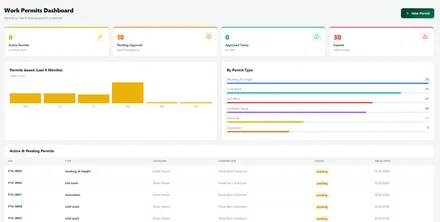
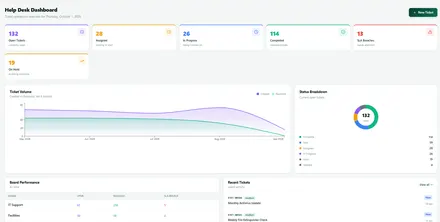
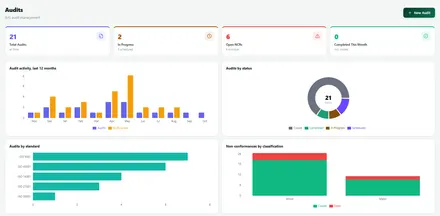
Screens
Approval workflow software inside every module
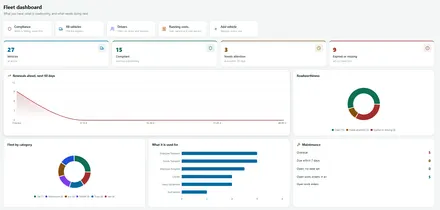
Requests in each of these modules move through the same approval chains.
FAQ
Approval workflow software FAQs
Which documents use the Nexora approval workflow software?
One approval engine serves multiple document types, currently outward passes, inward passes and work permits.
Can approval chains differ between branches?
Yes. Approval chains are configured per branch and per document type, not a single fixed rule for the whole company.
Can an approval step use a role instead of a named person?
Yes. An approver can be a fixed person, or a dynamic role such as the department manager of whoever raised it, or the manager of the area the work is in.
If we change an approval rule, does old history change?
No. Every approval stores a snapshot of the rules as they were at the time, so changing the rules tomorrow never rewrites yesterday's history.
What happens to an approval if the approver is on leave?
Chains can use dynamic roles instead of a single named person, and a dynamic rule finds the right person at the moment the request is made, which helps requests avoid stalling on one person. Decide cover arrangements for key approvers during setup.
Can we see where an approval is stuck?
Yes. Every approval workflow shows its current stage and the full history of earlier stages, so you can see exactly who it is waiting for.
What should approval workflow software do?
Approval workflow software sends each request to the right people in the right order, handles absences with delegation, escalates anything that waits too long and keeps a history nobody can edit. In Nexora the same approval workflow software serves permits, gate passes and other documents.
How does Nexora approval workflow software compare with Kissflow?
Kissflow is a no code platform where business users build their own forms and approval processes, sold on a quote based annual agreement. Nexora approval workflow software is built for permits and gate passes: chains per branch and document type, dynamic approvers and a snapshot of the rules on every approval, on the same platform as visitors, fleet and assets, with setup done for you by a local team.
What are the pros and cons of Nexora approval workflow software?
Its strengths are chains per branch and document type, fixed or dynamic approvers, several stages in order, a rule snapshot on every approval and a clear history of who decided what. Its limits are that it approves Nexora documents only, has no do it yourself form builder or Teams approvals, uses quote based pricing and has no permanent free plan.
See the approval workflow software on your own structure
A short, no pressure walkthrough using your own branches and approvers.