
Solutions · Asset Management
Asset tracking software for every laptop, machine and vehicle
Nexora Asset Management gives you one asset register for everything your company owns, each asset with an owner, a department, its important dates and its full history, so you always know what you have and what needs attention next.
Overview
One asset register instead of a long pause
Ask most companies how many laptops they own, who has them and when their warranty ends, and the honest answer is a long pause. The list lives in an old spreadsheet, a finance file and the memory of one IT person. Then a laptop goes missing when someone leaves, a generator breaks down after its support contract quietly ended, or an auditor asks for proof that every software licence is paid for.
Nexora asset management covers IT asset management and much more: it puts IT equipment, machines, generators, fire extinguishers, forklifts, vehicles, furniture and software licences in one place, each with an owner, a department, its important dates and its full history.
Nexora is a cloud based operations platform used by factories, offices, hospitals, banks, schools and construction sites. The asset tracking software works for a small office with fifty laptops and for a large company with thousands of assets across several branches and cities.
The problem
Why spreadsheets fail where asset tracking software works
A spreadsheet can hold a list, but it cannot watch dates, answer who is allowed to see what, or connect an asset to the problems it has had. As a company grows, the gaps show up as real costs.
Proper asset tracking software closes these gaps and pays for itself through fewer losses, fewer missed claims and far less time spent searching for answers.
Where spreadsheet asset lists cost money:
- Laptops and phones that leave with employees and are never returned.
- Warranties that expire before anyone claims a free repair.
- Support contracts and service agreements that renew, or lapse, without anyone checking.
- Software licences bought twice, or used without being paid for.
- Repair history scattered across emails, so nobody knows which machine keeps failing.
- Audits that take weeks because the information sits in five different places.
Asset register
One asset register for the whole company
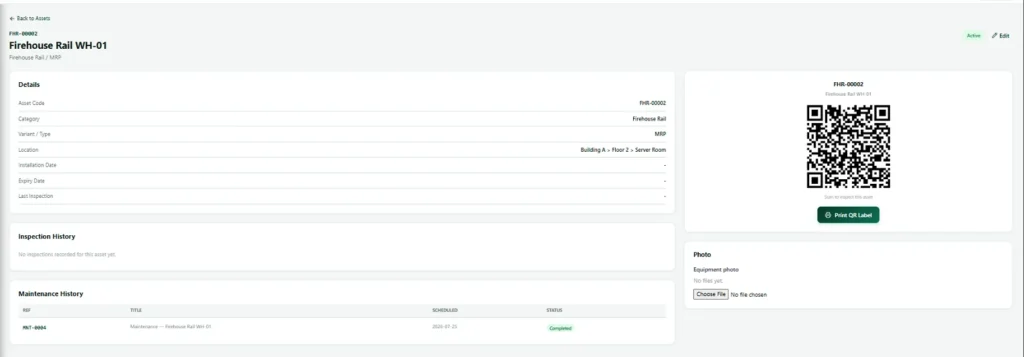
At the heart of the module is a single asset register. Every asset gets its own record and its own code, created automatically from its category. A laptop becomes LPT 00001, a forklift FLT 00001, a generator GEN 00001, so everyone in the company talks about the same asset in the same way.
Assets are organised the way your company already works: sections such as IT, Electrical, Civil, Fleet, HSE, Logistics or Transport; categories such as laptops, printers, generators, fire extinguishers, forklifts, buses and vans, each with its own short code; an owner who holds or uses the asset; and a department responsible for it.
Nexora also spots orphan assets, meaning assets that have no owner, so nothing sits forgotten in a store room or on an empty desk.
Each asset record holds:
- Make, model and serial number, with a check so the same serial number cannot be entered twice
- Service tag or asset tag
- Purchase date and purchase details
- Warranty end date
- Support or SLA end date
- End of life date, when the asset should be replaced
- A remote support ID for computers, for tools such as TeamViewer or AnyDesk
Reminders
Warranty, support and end of life dates that never slip past
Most asset losses are not dramatic. They are a warranty that ran out last month, a support contract nobody renewed, or a machine kept long after it should have been replaced. Nexora watches these dates for you.
- 190 days beforeFirst reminder to the asset owner.
- 230 days beforeTime to claim, renew or budget.
- 37 days beforeA firm nudge before the warranty date.
- 41 day beforeLast call before the date passes.
- 5After the dateOne more reminder, then the past list.
- 6Already coveredNo duplicate alert when a service agreement covers it.
The Expiries page lists everything coming up in one place: warranty end dates, support and SLA end dates, end of life dates and software licence renewals. You choose how far ahead to look, filter by type, and see only the assets you are responsible for or your whole department. Dates that have already passed are shown separately, so you can deal with them without losing sight of what is coming next. When an asset is already covered by an active vendor service agreement, Nexora does not send a separate reminder for its own support date, so people only get messages that need action.
Software licences
Software licence management with keys kept safe
Software is often the most expensive and least tracked asset a company has. Nexora gives software licences their own register, kept apart from hardware but linked to it. For every software licence you record the product, edition, vendor, number of seats, cost and renewal date.
A seat bar shows at a glance how many seats are used and how many are free, so you never buy more than you need and never go over what you paid for. When a seat is released, for example when a laptop is retired or a person leaves, the history is kept rather than deleted, so you can always show who held a licence and when.
Licence keys are stored encrypted. They are hidden by default, and every time someone reveals a key it is recorded with their name and the time. That gives your IT team a clear answer when an auditor or a software vendor asks who has access to your keys. When you need to buy or renew licences, our software licensing team supplies Microsoft, Adobe, Autodesk and more, following the ideas of the ISO/IEC 19770 standard for IT asset management.
Software licence types Nexora supports:
- Per device: each seat is tied to a laptop or computer in the asset register.
- Per user: each seat is tied to a named person.
- Site licence: one licence for a whole site or company.
- Subscription: a yearly or monthly plan with a renewal date.
Vendor SLAs
Vendor service agreement visits, counted at the gate
Many assets are looked after by outside vendors: the generator company that services your sets every quarter, the printer supplier, the air conditioning contractor, the lift maintenance firm. You pay for a set number of visits, but very few companies can say how many visits they actually received.
- 1Record the service agreementVendor, title, contract or PO number, dates, visits included and how often, owner, department, cost and currency.
- 2Choose the covered assetsPick exactly which assets the agreement covers.
- 3Book the visitChoose Service Visit (SLA) as the purpose and pick from that vendor’s active agreements only.
- 4Count it at check inThe visit counts only when the technician arrives and is checked in at the gate.
- Inside the agreementThe visit uses one of the period’s paid visits.Outside the agreementStill allowed in, but clearly marked so you can question the invoice.
- 6Record what was doneThe host or agreement owner notes the work and ticks the assets serviced.
The agreement page shows how many visits have been used this period, for example 1 of 1 this quarter, with every visit listed. Each covered asset shows when it was last serviced. The owner is reminded at 90, 30, 7 and 1 day before the agreement ends, so renewals are decided on facts, not on the vendor’s word. Gate staff see the agreement title and the visit count, never the contract value. This works through the same gate as Visitor Management and Gate Keeper.
Asset history
The full life story of every asset on one page
When a machine breaks down for the third time, you do not have to search emails to find out what happened the first two times.
Help desk tickets on the asset
Every ticket raised about the asset, with how many are still open and the time spent on them.
Asset maintenance history
Maintenance jobs carried out on the asset, with dates and who did the work.
Service agreement coverage
Which vendor agreements cover the asset and when it was last serviced.
Software licence assignments
The licences assigned to the asset, and on each licence, the assets and people it covers.
Remote support for each asset
For computers, the remote support ID is on the record, so the help desk can connect without walking to the desk.
Asset inspection checklists
Checklists per category for fire extinguishers, generators and forklifts, plus an asset catalog of standard makes and models.
This turns the asset register into a real decision tool. You can see which models fail most, which vendor’s equipment costs you the most support time, and which assets are due for replacement rather than another repair.
Access
The right people see the right asset records
Not everyone should see every asset, its cost or its licence keys. Nexora controls this by role, not by trust. Anyone without permission simply does not see the asset, as if it did not exist. Costs stay with the people who manage the budget, and licence keys stay with the people trusted to use them.
Who sees which asset:
- Asset managers and company administrators see and manage every asset, category, licence and service agreement.
- Department managers see and update the assets of their own department.
- Employees see the assets they hold and those of their department.
- Help desk staff see the assets linked to the tickets they work on.
Getting started
Start IT asset management quickly with your existing list
You do not have to type your assets in one by one. Download the Excel template, fill in your current list and import it. Nexora gives each asset its code, links it to its category, owner and department, and points out anything that needs fixing, such as a serial number entered twice.
If your IT team already uses a remote monitoring tool for computers, its device export can be brought in as well, so IT asset management starts with what is really on your network.
Built for real companies
Asset tracking software built for Pakistan, the Gulf and beyond
Nexora works the way companies in our markets actually run.
Every branch in one asset register
Keep assets for every branch, plant and office in one register.
Asset costs in any currency
Record costs in the currency you paid in, while the company’s own currency stays the base for totals.
Light on data for asset teams
Pages load quickly even on slower connections, which matters in many parts of Pakistan, the Middle East and beyond.
Asset records on any device
Use it on a computer in the office or a phone browser on the shop floor.
Secure asset and licence data
Each company’s data is kept separate, sensitive keys are encrypted, and backups are encrypted and stored offsite.
Asset tracking software on one platform
Help Desk, Maintenance, Fleet, Visitors and Staff Transport use the same people and departments.
One platform
Asset tracking software as part of one Nexora platform
Asset Management is one module of Nexora, so it connects with the rest of your operations. Help Desk tickets are linked to assets. Visitor Management and Gate Keeper count vendor service visits. Maintenance records the work done. Fleet keeps vehicles, their documents and their drivers. The same people and departments are used across every module, so you set them up once.
You can start with asset tracking software alone and add modules such as Help Desk, Visitor Management, Maintenance, QHSE, Work Permits or Staff Transport later, paying only for what you use. See how modules are priced.
Asset tracking software benefits at a glance:
- One asset register for IT equipment, machines, vehicles, safety equipment and software
- Automatic asset codes by category, and no duplicate serial numbers
- Clear owner and department for every asset
- Warranty, support, end of life and licence renewal reminders
- Software licence seats tracked, keys encrypted and every reveal recorded
- Vendor service agreements linked to assets, with visits counted at the gate
- Role based access, so costs and keys stay with the right people
- Faster audits, fewer losses and better replacement planning
Honest view
Nexora asset tracking software pros and cons
What it does best, and where another tool may suit you better.
Pros of Nexora asset tracking software
- One asset register for IT equipment, machines, vehicles, safety equipment and software licences.
- Automatic asset codes by category, and a check that stops the same serial number being entered twice.
- Reminders at 90, 30, 7 and 1 day before warranty, support, end of life and licence renewal dates.
- Software licence seats tracked, with keys stored encrypted and every reveal recorded by name and time.
- Vendor service agreement visits counted at the gate, so you can question an invoice with facts.
- Full asset history with help desk tickets and maintenance jobs on the same platform.
- Excel import and setup done for you, with support in Canada, the UK, the Gulf and Pakistan.
Cons of Nexora asset tracking software
- No public price list; you get a written quote based on users, sites and modules.
- No permanent free plan and no free open source edition, unlike Snipe IT.
- No built in network discovery agent; computers come in from Excel or a remote monitoring tool export.
- No CMDB or service dependency maps of the kind large IT teams use in ITSM suites.
- A younger product with a smaller public review base than the best known names.
Nexora suits companies that want laptops, machines, vehicles, safety equipment and licences in one asset register, linked to the help desk, maintenance and the gate. If your IT team mainly needs automatic network scans and a CMDB, a dedicated IT asset tool may fit better, and we can supply ManageEngine AssetExplorer.
Comparison
Asset tracking software compared: Nexora vs Asset Panda, Snipe IT, AssetExplorer and Freshservice
How Nexora compares with the asset tracking software companies shortlist most often, plus Futuresol, a regional suite sold in Pakistan and the Gulf. Pricing models are described rather than quoted, because vendors change their prices often.
| What matters | Nexora Asset Management | Asset Panda | Snipe IT | ManageEngine AssetExplorer | Freshservice | Futuresol |
|---|---|---|---|---|---|---|
| Main focus | Every asset type, on a platform for every department | Configurable asset tracking | Open source IT asset management | IT asset management | IT assets inside an ITSM suite | Facility, maintenance and asset management |
| Same platform runs help desk, maintenance, fleet, visitors, gate passes and permits | Yes, as Nexora modules | No | No | No | Help desk yes; no fleet, visitors or permits | Desk, visitors and fleet as separate Futex apps |
| Software licence seats and renewals | Yes, keys encrypted and every reveal recorded | Software tracked with IT assets | Yes, with expiry alerts | Yes, with compliance status | Yes, software asset management | Not described |
| Warranty and contract reminders | At 90, 30, 7 and 1 day before each date | End of life alerts | Email alerts for warranties and licences | Contract management | Contract renewal tracking | Expiry tracking in FutexBridge |
| Vendor service visits counted at the gate | Yes, through Visitors and Gate Keeper | Not described | Not described | Not described | Not described | Not described |
| Automatic network discovery | No; import from Excel or a remote monitoring tool export | Through integrations such as Jamf | Not built in | Yes, agent and agentless scans | Yes, automated discovery | Not described |
| QR or barcode labels | QR labels open the asset record | Barcode and QR labels | QR code labels | Barcode, QR and RFID scanners | Not listed on its asset page | Real time asset tracking |
| Pricing model and free option | Quote per company; free demo on your own asset list | Custom quote; 7 day free trial | Free to self host; hosted plans by tier | By number of assets; 30 day trial, then a free edition | Per agent plans plus asset unit packs; 14 day free trial | Quote based; demo on request |
| Setup and data import | Done for you, from your Excel list | Self serve or vendor help | Self hosted, or hosted by the vendor | Self serve or partner | Self serve or partner | Through the vendor |
| Local support in Canada, the UK, the Gulf and Pakistan | Yes, direct from ApexGenTech | Through the vendor | Community, or paid support plans | Through ApexGenTech as reseller | Through the vendor | Pakistan, the UAE and Saudi Arabia |
Based on each vendor’s published features in October 2026. ApexGenTech builds Nexora and resells ManageEngine. Check current plans on each vendor’s website before buying.
Nexora vs Asset Panda
Choose Nexora when assets must link to help desk tickets, maintenance jobs and vendor visits at the gate on one platform. Choose Asset Panda when you want a standalone asset tracker with its own mobile app and highly configurable fields.
Nexora vs Snipe IT
Choose Nexora when you want every asset type, reminders and setup done for you, without running a server. Choose Snipe IT when you have IT staff who are happy to self host free open source software for IT assets.
Nexora vs ManageEngine AssetExplorer
Choose Nexora when machines, vehicles and safety equipment matter as much as computers. Choose AssetExplorer when IT needs automatic network scans and licence compliance reports, and we can supply it.
Nexora vs Freshservice
Choose Nexora when HR, facilities and operations share one asset register with IT. Choose Freshservice when a larger IT team wants asset discovery and a CMDB inside a full ITSM suite.
Nexora vs Futuresol
Choose Nexora when you want assets, help desk, maintenance, visitors and permits on one platform with one login and support in Canada and the UK as well. Choose Futuresol when you already run its other Futex apps, such as HR or finance.
In practice
Asset tracking software in practice
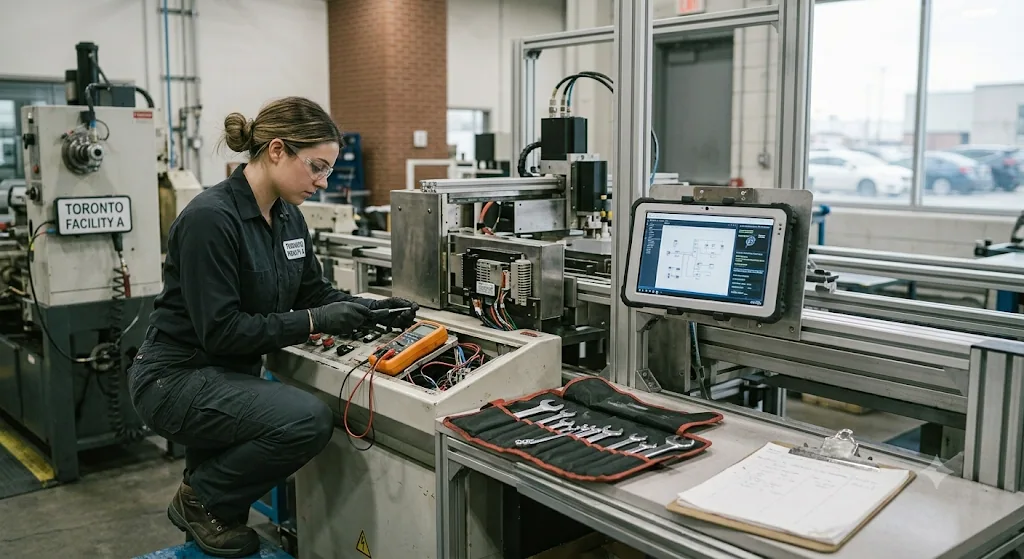
Assets, keys and equipment tracked from the workshop to the office.



FAQ
Asset tracking software FAQs
Can Nexora be used as fixed asset management software?
Yes. Nexora works as fixed asset management software, recording purchase cost, location, owner, warranty and depreciation details for every asset, with QR labels for quick audits.
What is asset tracking software?
It is a system that keeps a complete record of everything a company owns: what each asset is, who has it, where it belongs, when it was bought, when its warranty and support end, and what has happened to it since. It replaces spreadsheets with one register that watches dates and keeps history for you.
Can Nexora manage both IT asset management and other equipment?
Yes. Laptops, desktops, printers and phones sit in the same register as generators, forklifts, fire extinguishers, vehicles and furniture. Each type has its own category and code.
Does it track each software licence?
Yes. You can record licences per device, per user, per site or as a subscription, see how many seats are used, assign them to computers or people, and keep licence keys encrypted.
Will we be reminded before a warranty or contract ends?
Yes. Nexora reminds the right person at 90, 30, 7 and 1 day before warranty, support, end of life, licence renewal and service agreement end dates.
How does a vendor service agreement work in Nexora?
You record each service agreement and the assets it covers. Vendor visits are counted when the technician checks in at the gate, so you can see how many paid visits you really received and spot visits outside the agreement.
Can we import our current asset list?
Yes. You can import your list from Excel, and computers can also be brought in from a remote monitoring tool’s device export.
Who can see the cost of an asset or a licence key?
Only the people your company allows, such as asset managers and administrators. Everyone else sees only what their role needs, and every licence key reveal is recorded.
How does asset tracking software use QR codes?
Each asset gets a QR label. Scanning it with a phone opens the record, so staff can confirm where the asset is, who holds it and when it was last serviced. That is how asset tracking software keeps the register accurate without anyone retyping spreadsheets.
How does Nexora asset tracking software compare with Asset Panda?
Asset Panda is a well known standalone asset tracker with its own mobile app. Nexora keeps every asset in one register and links it to help desk tickets, maintenance jobs, software licences and vendor visits counted at the gate, on one platform, with setup and data import done for you.
What are the pros and cons of Nexora asset tracking software?
Its strengths are one register for every asset type, date reminders, encrypted licence keys, vendor visits counted at the gate and links to the help desk and maintenance. Its limits are quote based pricing, no permanent free plan and no built in network discovery agent.
See Nexora asset tracking software in action
If you are tired of chasing laptops, missing warranty claims or paying for service visits you never received, send us a sample of your current asset list and we will load it into Nexora, so you see your own assets, dates and reminders from day one.