
Solutions · Work Permits
Permit to work system: a permit that expires on its own
Permit to work system with area aware, three stage approval for hot work, confined space, working at height and any other controlled task, and automatic expiry so no permit quietly runs past its window.
The problem today
Why a paper permit to work fails
The permit to work is the document that stands between a controlled task and a serious incident. In most companies it is a piece of paper on a clipboard in a portable cabin, with signatures in three different pens and a validity window that nobody is actively watching.
Approval means a signature from someone who may or may not be the right person for that area, because the right person was in a meeting and the work needed to start. And work overruns, as work does. The permit expired at four and the job finished at six, and the two hours in between were unauthorised hot work that nobody recorded and nobody would be able to explain afterwards.
Then the auditor asks for the permits issued in the last quarter. They are in a lever arch file, sorted by nothing in particular, some of them water damaged, several missing. The company cannot demonstrate who authorised what, and cannot show that a single permit was closed on time.

Key features
Permit to work system that makes the whole permit a live record
A permit is raised with its details and its validity window, climbs a three stage approval chain that pulls in the right area owner, and when its window ends the system expires it by itself and tells the person who raised it. Nobody has to remember.
Three stage approval
Every permit climbs a proper approval chain, with each stage recorded, timed and attributable.
Area aware permit routing
The approval chain pulls in the owner of the area where the work is happening, automatically. No chasing the right signature.
Automatic permit expiry
When the validity window ends, the system expires the permit itself, records the time, and notifies the person who raised it.
Controlled permit extension
A live, approved permit can be extended. One that is not live cannot, and the system says so plainly.
A snapshot of the approval rules
Each approval stores the rules as they were at the time, so changing your workflow tomorrow never rewrites what happened yesterday.
A live permit dashboard
What is live right now, what expired, and the monthly picture. “What work is authorised on site at this moment” has an answer.
Approval
Approval that finds the right person
A permit is raised with the work details, the area, the validity window and the required controls. It then moves through a three stage approval chain. The chain is area aware, which is the part that saves the most time and the most argument.
Rather than a fixed list of names, the workflow can resolve an approver dynamically, including the owner of the area the work is happening in and the manager of the person who raised it. Work moving from one part of the site to another automatically brings in a different area owner, without anyone reconfiguring anything.
Every stage of the work permit is recorded with who approved it and when. There is no version of this where a permit is authorised and nobody can say by whom.
Expiry
A permit that expires without being watched
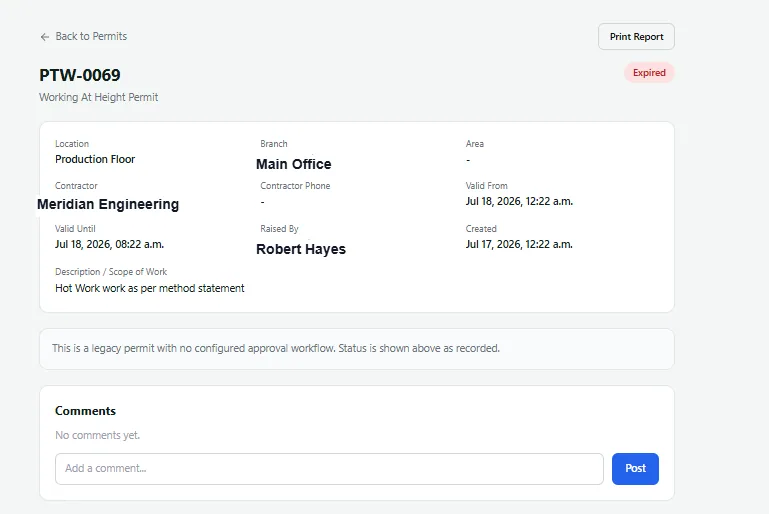
The system checks regularly. Approved permits that have passed their validity window are flipped to expired, the closing time is stamped, and the person who raised the permit gets a notification.
The stamp records that the system closed it rather than a person, which is deliberately honest. An expired permit is not a completed permit, and the record should not pretend otherwise.
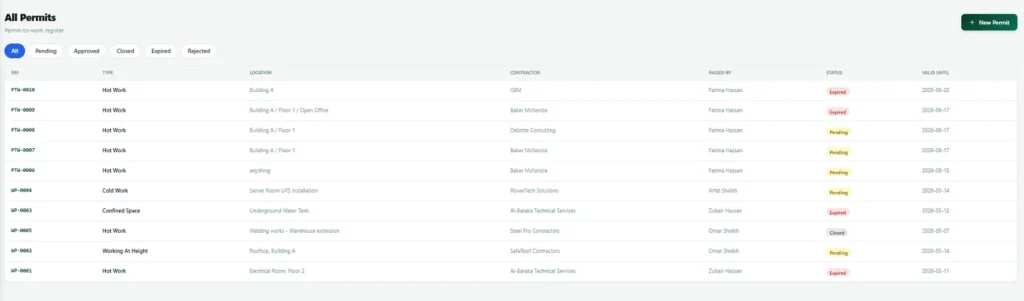
What that gives a site manager is the ability to answer the most important question in the module at any moment: what work is authorised on this site right now. On paper, that question has no reliable answer. Here it is a dashboard.
Extension
Permit extension that is actually controlled
Work overruns. Pretending it does not is how paper systems end up with unauthorised work happening under an expired permit. So extension exists, and it is controlled.
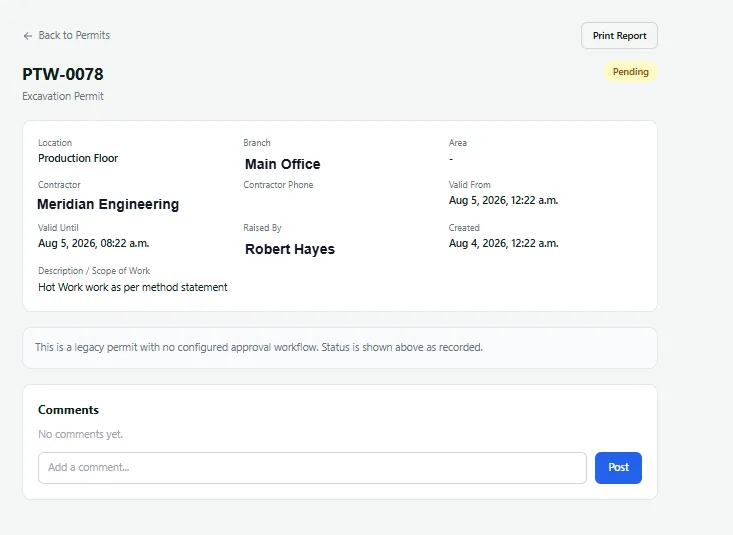
A permit that is live and approved can be extended, and the extension is recorded. A permit that is not live and approved cannot be extended, and the system refuses clearly rather than allowing it and hoping. That refusal is the whole safety value of the feature.
History
Permit history that stays true
Every approval stores a snapshot of the workflow configuration as it stood at the time. If you change your approval rules next quarter, permits approved this quarter still show the chain they actually went through.
This matters enormously in an audit. Without it, changing a workflow silently rewrites the apparent history of every document that ever used it, and your records start describing a process that was not the one anybody followed.

How it works
How a permit moves from request to expiry
These are the real statuses in the system. Expired is a status the system applies on its own, not one a person selects.
Permit statuses
The approval chain climb
A permit card rises through three levels, a tick appearing at each. Level labels show who approves at that step, including the dynamic ones such as the owner of the area where the work is happening.
Live dashboard
A live permit dashboard: what is authorised right now
Every work permit that is live right now, what expired, and the monthly picture.
Work permits dashboard
What gets recorded
What permit to work system records for every permit
| Record | What is captured |
|---|---|
| Identity | Permit reference number, work description and type, area and location, and branch. |
| Validity and controls | The validity window, from and to, and the required controls. |
| Raised by | Who raised the permit and when. |
| Approvals | Every approval stage with its approver and its timing, plus the snapshot of the approval configuration used. |
| Extensions | Any extensions to the permit. |
| Closure | The closing time and whether it was closed by a person or expired by the system. |
| Attachments | Files attached to the permit. |
What the manager sees
What the manager sees on the permit board
| View | What the manager sees |
|---|---|
| Live permits | What is live on site right now. |
| Expired permits | What expired rather than being closed, which is the number that tells you how well your permit discipline is really working. |
| Monthly figures | The monthly picture of permits. |
| Breakdowns | Permits by area and by type. |
Works with
Permit to work system that works with the rest of Nexora
Nexora Gate Keeper
Control what leaves and enters the site, with approvals and returnable item chasing.
Nexora HSE
Observations, incidents and inspections, sharing one location structure and the asset register.
Nexora Audits
Findings close only with a root cause and a corrective action written in.
Approval engine
Configurable, multi step approval chains with a full history.
Why permits fail
How a live permit to work record fixes paper failures
Paper and spreadsheet permits fail in predictable ways. A permit is signed, but nobody can see which ones are active right now. A permit runs past its window because nobody noticed. Approvals are given verbally and written up afterwards. A copy is lost and the evidence disappears just when it is needed most.
A live record fixes each of these. Active permits are visible on one screen. Permits expire on their own, so nothing runs past its window. Approvals happen in the system, in order, with a time stamp. And the full history of every permit is kept, so an investigation or audit starts from facts instead of memory.
Regulators take this seriously. The UK Health and Safety Executive guidance on permit to work systems describes many of the same failures, and safety authorities in the Gulf and in Pakistan expect the same discipline on industrial and construction sites. A permit to work that lives in software, with hot work, confined space and working at height each on its own approval chain, gives you the evidence those authorities ask for.
Getting started
Getting started with permit to work system
- 1
List your permit types
Hot work, confined space, work at height and any others you use.
- 2
Map each approval
Who signs for each type, in what order, in which areas.
- 3
Configure each approval chain
Set approvers, stages and validity windows.
- 4
Train people on the permit process
A short session using real examples.
- 5
Go live with the permit board
Watch the live board and tune the chains after a few weeks.
Related: Permits use the approvals engine, link to HSE inspections and maintenance work, rely on training records, and share site control with Gate Keeper and visitors.
FAQ
Permit to work system FAQs
Is the approval chain in the permit to work system configurable?
Yes. Chains are configured per branch and per document type, and approvers can be fixed people or resolved dynamically, including the owner of the area where the work is happening.
What happens when a work permit expires?
The system flips it to expired on its own, stamps the closing time, and notifies whoever raised it. The record shows the system closed it rather than a person, which is the honest signal.
Can a work permit be extended past the original window?
Yes, if the permit is live and approved. The extension is recorded. If the permit is not live and approved, extension is refused.
Does changing our approval rules affect old permits?
No. Each approval stores a snapshot of the rules as they were at the time, so historic permits keep showing the chain they actually went through.
Does the permit system handle contractor insurance checks?
Not today. Contractor records with insurance and induction checks are on our roadmap, and we would rather tell you now than in a demo.
What makes a good permit to work system?
A good permit to work system makes the safe path the easy one: the right permit type for the job, isolations confirmed before work starts, clear approvals, a handover at shift change and a permit that closes itself when time runs out. That is how Nexora runs every permit to work system it supports.
See a permit expire by itself
We will show you the live permit board and the automatic expiry, using your own areas and approval structure.