
Solutions · Audits
Audit management software: findings you cannot close with an empty box
Audit management software to plan audits against your own standards, raise non conformances, attach the evidence, and close each one only when a root cause and a corrective action have actually been written.
The problem today
Why audit findings get closed with “done”
An audit is only worth running if the findings it produces get closed properly, and that is the real job of audit management. That is where most audit processes quietly fail: the findings go into a spreadsheet owned by one person, and a few months later it shows everything closed, with a column of one word entries like “fixed” and “done”.
No root cause, no corrective action, no evidence, no verification that the fix worked. A year later the same finding is raised again in the same area, and nobody notices it is the same finding.
Then there is the evidence problem. The auditor’s photographs are on somebody’s phone, the new procedure is in a folder, and the proof it was implemented is in a mailbox. None of it is attached to the finding, so demonstrating any of it means an afternoon of assembly.
Key features
Audit management software built around proper closure
Nexora Audits is built so that empty closure cannot happen. A non conformance cannot be closed until a root cause and a corrective action are written in, and that rule is enforced both on the screen and on the server.
Audit against your own standards
Keep a configurable list of the standards you work to, and pick which ones each audit covers.
A real audit lifecycle
Scheduled, in progress, completed, closed. Planned work and finished work are visibly different things.
Findings classified properly
Every non conformance is raised as major, minor or observation, so the severity mix is readable at a glance.
Evidence on the audit finding
Photographs and documents attach to each non conformance and stay attached through closure.
Audit closure that cannot be faked
No non conformance closes without a root cause and a corrective action. Enforced on the screen and again on the server.
Open and overdue findings in view
The dashboard shows open and overdue non conformance counts, so nothing sits quietly past its date.
Standards
Your ISO and audit standards, kept as a list
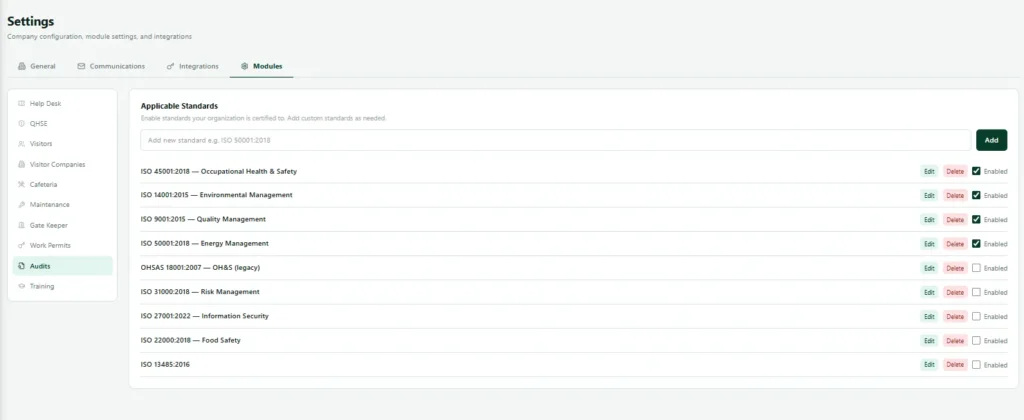
Nexora audit management holds a configurable list of the standards your business works to, whether that is quality under ISO 9001, environmental, occupational health and safety, or something specific to your industry or your customers. When you create an audit you pick which standards it covers.
Standards can be added, renamed and switched off when they stop being current. They are never deleted, and that is on purpose. An audit run three years ago against a standard you no longer use is still a real audit, and deleting the standard would quietly damage history.
The audit itself
How the audit lifecycle keeps planned and finished work apart
An audit carries its scope, its date, its lead auditor, its department and its standards. It moves through four states, each meaning something distinct.
Audit scheduled
Coming up. A manager looking at the audit plan can see what is coming.
Audit in progress
Happening now.
Audit completed
The audit work is done. Plenty of audits sit completed for months while their findings are worked.
Audit closed
Everything that came out of the audit has been dealt with. It is fully wrapped up.
Non conformances
Each non conformance classified and evidenced
Findings are raised against the audit as non conformances, classified as major, minor or observation. Each one takes evidence: photographs, documents, whatever was gathered at the time.
That evidence sits on the finding and stays there through closure, so demonstrating what was found and what was done about it is one record rather than an assembly job. Classification is what makes a year of audits readable. Twelve minors and one major is a different year from thirteen majors, and that difference should be visible without reading every finding.
The closure rule
The audit closure rule that makes history worth having
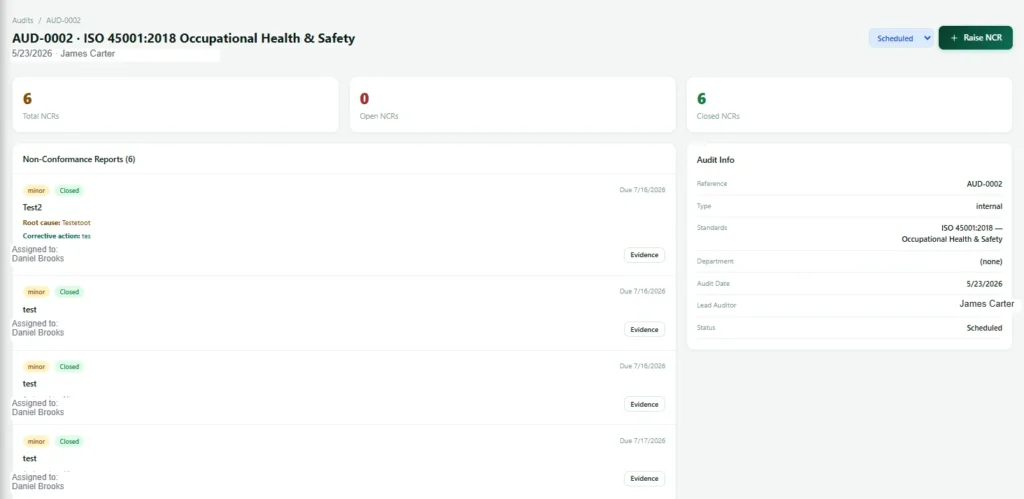
A non conformance cannot be closed without a root cause and a corrective action. The screen will not let you, and if anything tries to go around the screen the server refuses it as well. It is the one that makes the difference between an audit history that is useful and one that is decorative.
It costs the person closing a finding an extra two minutes of actual thought. In exchange, when the same problem shows up in the same area next year, there is a written record of what everyone believed caused it last time and what they did about it.
One honest note. The rule applies to findings closed from the point it is switched on. Findings closed before that, in whatever system you were using, are not retrospectively improved. A rule fixes new data, never old.

How it works
How an audit and its findings move
Two connected flows. The audit runs through its own lifecycle, and each finding it raises runs through its own.
Flow A: the audit
Flow B: a non conformance (raised during Flow A, stage 2)
Live dashboard
An audit dashboard with open and overdue findings
Open and overdue counts derived live from the findings.
Audits dashboard
What gets recorded
What audit management software records for each audit
| Record | What is captured |
|---|---|
| Audit | Audit reference, scope, date, lead auditor, department and the standards covered. |
| Audit status | Every status change through scheduled, in progress, completed and closed. |
| Non conformance | Classification (major, minor or observation), description and evidence files. |
| Closure | Root cause, corrective action and closure history. |
| Open and overdue counts | Derived live from the findings. |
What the manager sees
What the audit manager sees at a glance
| View | What the manager sees |
|---|---|
| Audit plan | The audit plan for the year and where each audit has got to. |
| Open findings | Open non conformance counts and how many are overdue. |
| Classification mix | The severity of what is being found, visible without reading everything. |
Works with
Audit management software that works with the rest of Nexora
Nexora HSE
Observations, incidents and inspections, sharing one location structure and evidence trail.
Nexora Work Permits
Area aware approval, and permits that expire on their own.
Nexora Training & LMS
Courses, exams, learning paths and certificates with public verification.
Connected
How Audits connects to the rest of Nexora
Audit management software is most useful when what audits find actually gets fixed. In Nexora, Audits shares its people, locations and asset register with every other module, so a finding is never an isolated line in a report. It can point at the same asset or area that appears in inspections, maintenance jobs and permits, and everyone sees the same record.
That shared foundation also helps when it is time to prove something. An auditor, a customer or a regulator can follow a finding from the day it was raised, through the root cause and corrective action, to the day it was closed, without anyone assembling evidence from separate files. Reports and dashboards draw on the same live records, so the numbers you present are the numbers in the system.
Getting started
Getting started with audits
A simple path from your first audit to a working programme.
- 1
Choose your ISO standards
Set up the standards you audit against, such as ISO 9001 or ISO 45001.
- 2
Plan the audit programme
Schedule audits by site and area, and assign auditors.
- 3
Run the audit
Record findings with evidence on a phone or tablet.
- 4
Close each non conformance
Require a root cause and a corrective action before a finding can close.
- 5
Review audit findings
Use live dashboards to see open findings and trends.
A better audit
What makes an audit programme actually improve things
In audit management, the value of an audit is not the report, it is what changes afterwards. Programmes that improve things tend to share a few habits: they audit against clear standards, they record evidence rather than opinions, they require a real root cause for each finding, and they follow corrective actions until they are done.
Nexora audit management is built around those habits. Findings close only with a root cause and a corrective action written in, evidence is attached to the record, and dashboards show open findings by standard, so management can see whether the programme is working and where attention is needed. For information security audits against ISO 27001, our security audit team uses the same discipline.
Related: Audit findings connect to HSE inspections, maintenance work orders, training actions and the approvals engine; see the platform for reports.
FAQ
Audit management software FAQs
Which standards does the audit management software support?
You keep your own list and pick which ones each audit covers, so it fits whatever standards your business, your industry or your customers work to.
Can we delete an audit standard we no longer use?
You can switch it off so it stops appearing on new audits, but it is never deleted. Deleting it would damage the history of audits that were genuinely run against it.
Can an audit finding really not be closed without a root cause?
Correct. The screen refuses it and the server refuses it independently, so it cannot be bypassed.
Does the audit management software track corrective actions with owners and due dates?
The corrective action is recorded on the finding and is mandatory for closure. A separate corrective action lifecycle with named owners, due dates and effectiveness verification is on our roadmap, not in the product today.
Can we attach the ISO standard document and a checklist?
Not yet. It is on the list of things customers have asked for and we are not going to pretend otherwise.
Why use audit management software instead of spreadsheets?
Spreadsheets record findings but rarely make anyone close them. Audit management software assigns each finding to an owner with a due date, sends reminders, needs evidence before closure and shows managers what is overdue. That is the difference between finding problems and fixing them.
See an audit finding refuse to close
It takes about ten seconds and it usually explains the whole product better than we can.