
Nexora · Modules
Operations management software: Nexora modules that run your business in one place
Help desk, asset management, fleet, transport, visitors, maintenance, permits, audits, training and health and safety. The Nexora modules bring the everyday running of a company onto one connected operations management software platform that your whole team can actually use.
One platform
Why Nexora is built as modules on one platform
Most companies run on a patchwork: a spreadsheet for assets, an inbox for IT requests, a paper register at the gate, a folder of permits, a calendar of vehicle renewals and a separate system for training. Each tool works on its own, but none of them knows about the others, which is exactly the gap good operations management software should close. The same laptop, vehicle or person is typed in again and again, and the records never quite agree.
The Nexora modules replace that patchwork with a single cloud operations management software platform. You set up your people, departments, sites and assets once, and every module uses the same records. A help desk ticket can point at the exact asset that broke. A maintenance job can attach to the same asset. A fleet vehicle is simply an asset with extra fields, and a staff transport route uses the same vehicles and the same people.
Because the modules are licensed individually, you do not have to take everything at once. Start with the one that hurts most, add another when you are ready, and switch it on without migrating anything. The pieces already fit together.
Assets, fleet & transport
Asset, fleet and transport modules
Know what you own, keep every vehicle legal and run staff transport on time.
Asset Management module
One register for every asset and software licence, with warranty and expiry reminders, ticket history and Excel import.
Fleet Management module
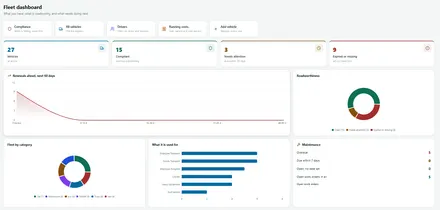
Vehicles, servicing, documents and driver licences, with reminders before anything runs out and pool car booking.
Employee Transport module
Staff routes drawn on real maps, stops, pickup times, shifts and seat booking in one place.
Safety & compliance
Safety and compliance modules
Capture hazards, investigate incidents, run audits and control high risk work with one evidence trail.
HSE module
Observations, incidents and inspections, sharing one location structure and evidence trail.
Audits module
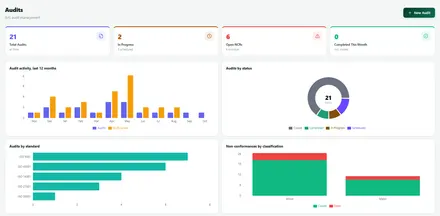
Findings close only with a root cause and a corrective action written in.
Work Permits module
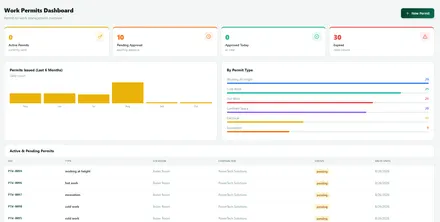
Area aware approval, and permits that expire on their own.
Site & access
Site access and gate control modules
Know who is on site and what is leaving it, with approvals and reminders built in.
Visitors module
Pre register, invite with a QR code, check in and out, with overstay reminders.
Gate Keeper module
Control what leaves and enters the site, with approvals and returnable item chasing.
Operations
Operations and maintenance modules
Keep equipment and daily site services running on schedule.
Maintenance module
Preventive schedules that generate work orders automatically, linked to the asset.
Cafeteria module
Kiosk based meal attendance and consumption tracking.
People & support
People and support modules
Train your workforce and resolve internal requests in one place.
Training & LMS module
Courses, exams, learning paths and certificates with public verification.
Help Desk module
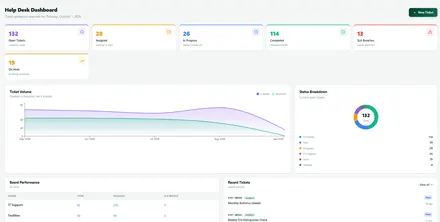
Internal tickets for every department, with boards, escalation and email to ticket.
How it connects
One record, used everywhere in Nexora
The real value of the Nexora modules shows when they work together. A few examples show how.
Because everything uses the same people, departments and assets, reports are accurate without anyone reconciling spreadsheets, and an auditor can follow a record from request to completion on a single screen.
What connected records look like in practice:
- A staff member reports a broken laptop in the help desk and picks the exact asset. The asset page then shows every ticket ever raised for it, and a maintenance job can be linked to the same record.
- A vehicle is registered once in fleet management. The same vehicle is assigned to a staff route in transport, with its seats set up for riders, and its service and document dates feed the same reminder engine.
- A visitor is pre registered, approved and checked in at the gate, while a delivery truck leaves with returnable items that Gate Keeper chases until they come back.
- A work permit is approved through a multi stage chain, expires on its own at the end of its window, and links to the area and the asset the work is on.
Getting started
How to choose and start with Nexora modules
- 1
Find your first Nexora module
Which spreadsheet, inbox or paper process costs you the most time today? That points to your first Nexora module.
- 2
Pick your first modules
We recommend a starting set, usually one or two Nexora modules, that solve it quickly.
- 3
Import data into Nexora
Bring existing lists across from Excel, validated before anything is created.
- 4
Train your Nexora users
Short sessions for administrators and for everyday users.
- 5
Add more modules when ready
Switch on further Nexora modules later, with no migration and no new login.
Security and ownership
Nexora modules are secure by design, and your data stays yours
Nexora runs on secure servers with encrypted connections and encrypted offsite backups. Each company has its own private tenant, separated from every other customer at the database layer. Two factor authentication is mandatory, as the UK National Cyber Security Centre and similar bodies recommend, and you control what each person sees by module and by role.
If you ever decide to leave, you can export a full copy of your data, including every record and uploaded document, as a single package. We think that is how software should treat its customers. Read more about this on our security and data page.
Where to start
Which module should you start with?
You do not need to adopt everything at once. The best first module is usually the one attached to the problem that costs you the most time or carries the most risk today. A few common starting points:
If you are unsure, tell us about your day to day work and we will recommend a sensible first step. Many clients begin with one or two Nexora modules and add more as the benefits become clear.
Start where it hurts:
- Staff chase IT or facilities by email: start with Help Desk.
- You do not know what you own or when warranties expire: start with Asset Management.
- Vehicle renewals and driver licences are tracked on a calendar: start with Fleet Management.
- Staff transport runs on spreadsheets and phone calls: start with Employee Transport.
- Risky work needs signed approvals: start with Work Permits.
- Visitors sign a paper book at the door: start with Visitors.
- Equipment servicing depends on one person’s memory: start with Maintenance.
By industry
How different organisations use operations management software
The same modules combine differently depending on the organization. A manufacturer might run Work Permits, HSE, Audits and Maintenance together on one QR coded asset register. A hospital might use Training, Visitors and incident reporting. A logistics company might lean on Gate Keeper, Fleet and Maintenance. A corporate office might run Help Desk, Visitors and Asset Management.
Because each module is licensed on its own, nobody pays for features they do not use, and the mix can change as the organization does. See our industries page for more examples.
Rolling out
Support for your Nexora rollout
Software only helps when people use it, so we treat rollout as part of the product. We help you set up modules, branches, departments and users. We help you import existing lists from Excel, checking every row before anything is created. We train administrators and everyday users in short sessions, and we stay available afterwards, from a quick question to a full support agreement.
Our teams across Canada, the UK, the UAE and Pakistan cover a wide span of the working day, so help is rarely far away. You can read how our support tiers work on the Support and SLA page.
Honest limits
What Nexora is, and what it is not
Nexora is operations management software: it keeps records, runs approvals, sends reminders and reports on what is happening. It is not a replacement for specialist systems that do very different jobs, such as full accounting, payroll or a manufacturing execution system, and we will not pretend otherwise. Where it helps, we connect Nexora to those systems instead. For retail invoicing in Pakistan, our separate Dijan ERP handles POS and FBR digital invoicing, and our software licensing team supplies the other business software you need.
It also does not track vehicles live by GPS today. Nexora focuses on vehicle records, servicing, documents, drivers and bookings, and live GPS is on our future plans. We would rather tell you what a module does and does not do before you buy than let you discover it during a demo.
Related: Looking for something specific? See asset management, fleet, employee transport, the help desk, permits or visitors, or read how the platform ties them together.
Screens
Operations management software in action
Every Nexora module opens on a live dashboard like these.
FAQ
Operations management software FAQs
Can we license only some of the Nexora modules?
Yes. Modules are licensed individually, so you buy what you use and switch on more later without changing systems.
Do the modules share data?
Yes. Every module uses the same asset register, locations, branches, users and approval engine, so one record is used everywhere instead of being retyped.
Is Nexora only for health and safety?
No. QHSE is one part. Nexora also covers help desk, asset management, fleet, transport, visitors, gate control, maintenance, work permits and training.
Can Nexora import our existing data?
Yes. Bring your lists across from Excel. Nexora validates every row first, shows you any problems and only then imports, so nothing is half saved.
Who is Nexora for?
Companies of all sizes across manufacturing, healthcare, logistics, construction, education and corporate offices, anywhere there are people, equipment, sites and dates that need tracking.
How do I see Nexora with my own scenario?
Book a demo. We will walk through the modules using a realistic example from your organization rather than a generic script.
What is operations management software?
Operations management software runs the daily work that keeps a business going: requests, permits, visitors, maintenance, audits, training and safety. Nexora is operations management software with 12 modules on one platform, so each record connects to the people, sites and assets it affects.
See Nexora operations management software working together
A short, no pressure walkthrough using your own sites and approval structure.