
Solutions · Help Desk
IT help desk software for every request, on one system
Nexora Help Desk is IT help desk software and a ticketing system that works for IT, HR, facilities, finance, maintenance and QHSE, with boards per department, escalation that fires on its own, and a record of who asked for what.
The problem today
Why email and group chats are not a help desk
Most companies have an IT help desk and nothing for everybody else. So the IT requests go into a system and the rest of the business runs on emails, phone calls, corridor conversations and a WhatsApp group somebody set up two years ago. Good IT help desk software gives every department its own place to receive work, and Nexora Help Desk does exactly that. Requests arrive on a board, get assigned to a person, move through a lifecycle everyone can see, and finish with a written reason for closing.
Today, the person who needs something sends an email, or grabs someone in the corridor, or posts in a group chat. It gets picked up, or it does not. There is no record of when it was asked, no record of who took it on, and no way of knowing whether it is still moving. When it stalls, the only escalation route is to complain louder.
Then the year end arrives and somebody asks how many requests the team handled, how long they took, and where the pressure is. Nobody can answer, because the requests were never in one place. The team knows they were busy. They cannot prove it, and they cannot argue for another pair of hands without the numbers.

Key features
IT help desk software features
Six things that give every department a queue it can run and report on.
A help desk board for every department
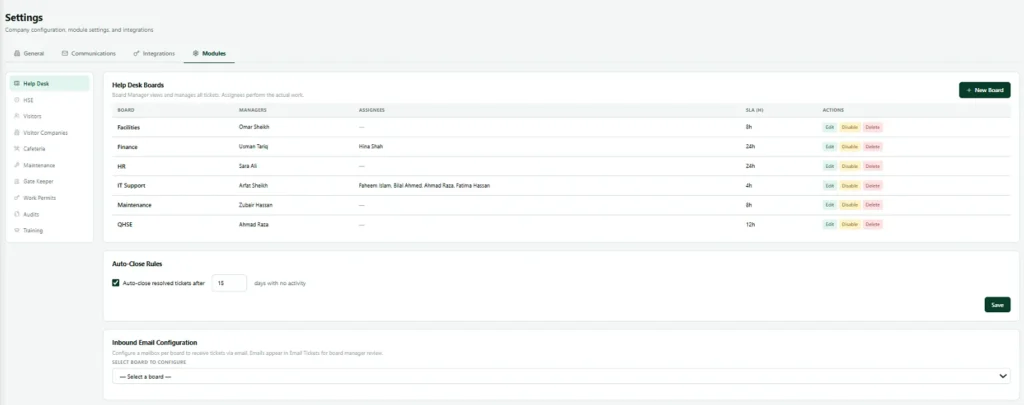
IT Support, HR, Facilities, Finance, Maintenance, QHSE. Each department gets its own board with its own members and its own workflow.
Structured ticket fields
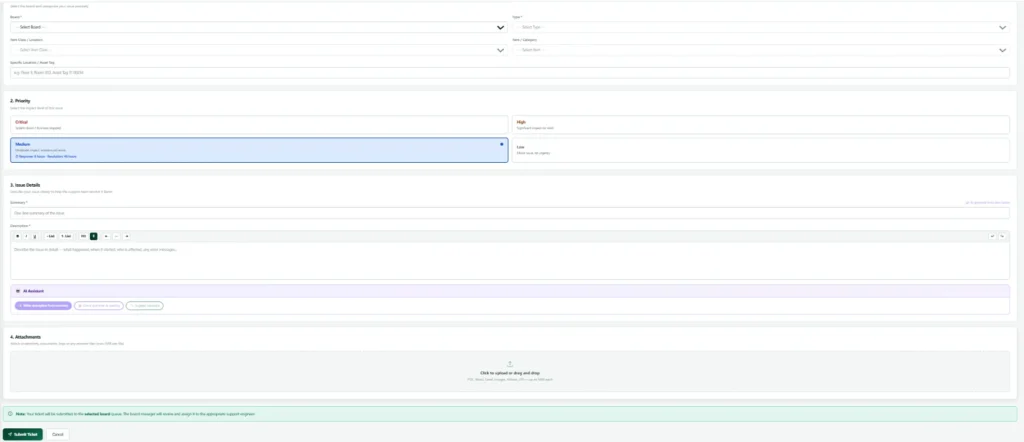
Every ticket carries a category, type, class, item and priority, so your reporting means something instead of being a wall of paragraphs.
Escalation that runs itself
Each board has its own escalation ladder. When a ticket sits too long it moves up the chain automatically, without anyone chasing.
Email straight into a ticket
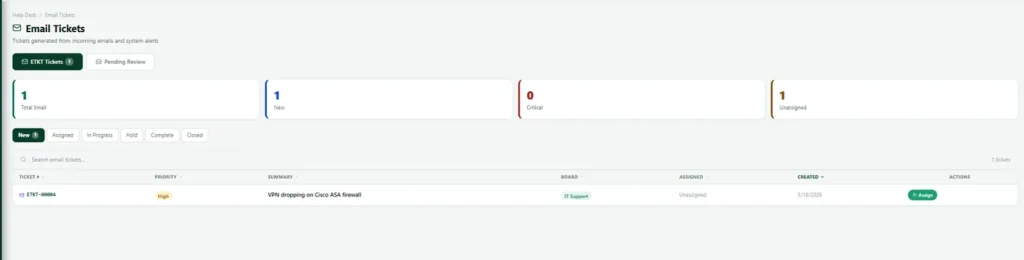
Give a board its own mailbox. Incoming mail becomes a ticket with a review step before it lands, so the inbox stops being the system of record.
Ticket access that holds
People see the tickets they raised, the tickets assigned to them, and the tickets on boards they belong to. Everything else is closed to them.
A reason for every ticket close
Closing or reopening a ticket requires a written comment. Six months later there is still an explanation attached to the record.
Boards
One help desk system, every department
Boards are the heart of this IT help desk software. A board is a department’s own queue with its own members, its own escalation rules and its own optional mailbox. The IT help desk runs one. Facilities runs another. HR runs a third, and nobody outside HR sees what is on it.
Anybody in the company can raise a request on any active board, which sounds obvious and is the thing most systems get wrong. A person who does not know whether their broken door handle is a facilities job or a maintenance job should not have to work that out before they are allowed to ask. They pick a board, describe the problem, and the team sorts out routing if it lands in the wrong place.
Structured tickets
Ticket data you can actually report on
A ticket is not just a title and a paragraph. It carries a category, a type, a class, an item and a priority. That structure is what turns a year of tickets into an answer: which category generates the most work, which item breaks most often, which board is drowning, and what the priority mix looks like month to month.
Every ticket gets a reference number, so a person can quote it in an email, a manager can pull it up in a meeting, and a record can be found again in a year without a search through somebody’s mailbox.
Escalation
Escalation without chasing
An escalation ladder is set per board. It measures a ticket against how long it has been open and moves it up the chain when it passes the threshold. It runs on a schedule in the background and never fires twice for the same step, so nobody gets six copies of the same warning.
The result is that a stalled ticket surfaces because the system noticed, not because the requester finally lost patience. That is a quieter, fairer help desk, and it means the loudest voice stops setting the priority order.

Email to ticket
The mailbox that becomes a ticketing system
Plenty of teams already have a shared mailbox that acts as a help desk by accident. Point that mailbox at a board and the mail becomes tickets. There is a review step before anything lands, so newsletters and automated noise do not clog the queue.
The subject line can carry the board, type, class, item and priority in brackets, which means a system that already sends email into that mailbox can route itself without any integration work.
How it works
How a help desk ticket moves
Every request follows the same path, whichever board it lands on. The stages are the real statuses in the system, not a simplified marketing version.
Help desk flow: from request to close
Live view
The help desk dashboard in action
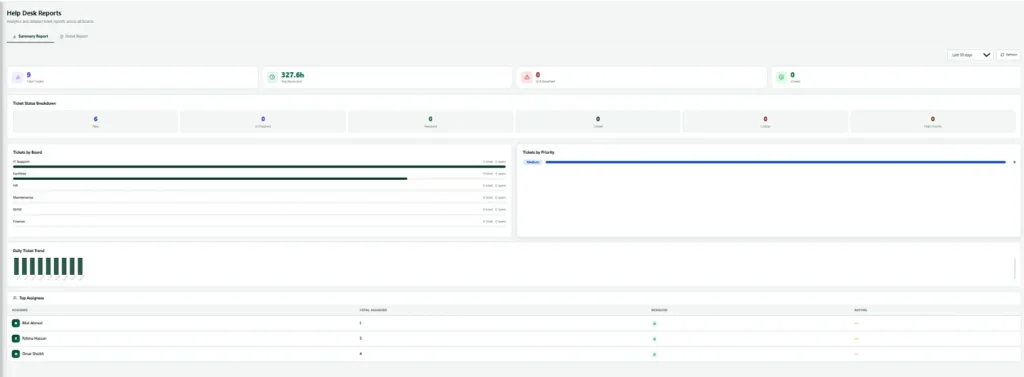
An example of the help desk view inside Nexora.
Evidence
What the help desk records on every ticket
A complete history that stays with the ticket, whoever picks it up.
| Record | What is captured |
|---|---|
| Identity | Reference number and board |
| Classification | Category, type, class and item, plus priority |
| People | Who raised it and when, and who it is assigned to |
| Lifecycle | Every status change |
| Comments | Every comment, including the mandatory comments on close and reopen |
| Escalation | Escalation events |
| Attachments | Attachments on the ticket |
| Email origin | Where the ticket came in by email, the original message is kept with it |
Reporting
What the help desk manager sees
Open work per board. Who is carrying what. Which tickets have escalated and how far. The mix of categories and priorities over time.
And reopened tickets, which is the number that tells you whether things are being closed properly or closed quickly.
Works with
Help desk alongside the rest of Nexora
Switch on more modules later without changing systems.
Nexora HSE
Hazard observations, incident investigation and QR scanned inspections, sharing one evidence trail.
Nexora Maintenance
Preventive schedules that generate work orders automatically, linked to the asset.
Connected
How Help Desk connects to the rest of Nexora
IT help desk software is only as good as what it knows. In Nexora, Help Desk is connected to the asset register, so a person reporting a broken laptop can choose the exact asset, and the technician sees its history immediately. Later, the asset page shows how many tickets have been raised for it, how many are open and how many are closed, which makes it easy to spot equipment that costs more to fix than to replace.
The same connection works with maintenance and fleet. A ticket about a vehicle can be linked to that vehicle, and a repair job can follow. Because the help desk uses the same departments, people and approval rules as the rest of the platform, requests reach the right team on the first try and nobody has to type in details they have already given.
Choosing
Choosing IT help desk software: ticketing system or ITSM suite?
IT help desk software comes in two broad shapes. A ticketing system receives requests, routes them and tracks them to a close. A full ITSM suite adds formal change, problem and release management for large IT departments that follow frameworks such as ITIL. Both have their place.
Nexora is IT help desk software that serves the whole company, not only the IT team. It gives IT, HR, facilities and other teams a proper ticketing system with escalation and reporting, connected to your assets and maintenance, without the weight of a full ITSM rollout. If your IT help desk needs deep ITIL processes, we will say so, and our ManageEngine licensing team can supply ServiceDesk Plus instead.
Whichever route you choose, the test is the same: can a person raise a request in under a minute, does it reach the right team, and can a manager see where the pressure is at the end of the month? IT help desk software that passes that test gets used, and IT help desk software that fails it gets bypassed by email.
Getting started
Getting started with the help desk
A quick route to a working service desk.
- 1
Create your help desk boards
Set up boards for IT, facilities, HR or any team that takes requests.
- 2
Define priorities and escalation
Agree how urgent each kind of request is and when it escalates.
- 3
Open the ticketing system to staff
Let staff raise tickets by form or by simply sending an email.
- 4
Link each ticket to an asset
Choose the exact item affected so history builds up.
- 5
Review help desk reports
See volumes, response times and the problems that keep returning.
Related: Tickets link to assets, vehicles and maintenance jobs. See the platform, pricing or our own support agreements for the service side.
FAQ
IT help desk software FAQs
Is this IT help desk software only for the IT team?
No. It was built so that any department can run a board. The IT help desk is usually the first, then facilities and HR follow once people see it working.
Can everyone see every ticket?
No. A person sees the tickets they raised, the tickets assigned to them, and the tickets on boards they are a member of. Company administrators see everything. Anyone else gets a clean refusal rather than a partial view.
Can our shared mailbox feed the help desk?
Yes. Point it at a board and incoming mail becomes tickets, with a review step before anything lands in the queue.
What happens to a ticket when someone leaves?
Their tickets stay on the board with their full history. Reassign them to whoever picks up the work. Nothing disappears with the person.
Do we have to use every ticket classification field?
They are there so your reporting is useful later. You decide how much structure your teams need, and you set the options yourself in Settings.
Can Nexora IT help desk software replace an ITSM tool?
For many companies, yes. Nexora covers tickets, boards, escalation, email to ticket and reports across every department. Large IT teams that follow ITIL closely and need full change and problem management may prefer a dedicated ITSM tool, and we will tell you honestly which fits.
What should IT help desk software do for a growing company?
Good IT help desk software gives every team one place to log requests, routes each ticket to the right person, tracks response times against your SLAs and shows managers where work is piling up. Nexora does all of that for IT and for every other department on the same system.
See the IT help desk software running on your own boards
We will set up a walkthrough using departments and request types that look like yours, not a generic demo.