PHP2Shell is the name given to two critical flaws in PHP itself, tracked as CVE-2026-109618 and CVE-2026-109619. Together they let an attacker who is not logged in run their own code on a web server that uses PHP. PHP runs a very large share of the web, including WordPress, Drupal, Joomla, Laravel and Magento sites, so the PHP2Shell vulnerability touches almost every company that has a website.
The PHP team released fixed versions on 21 October 2026, and governments around the world told website owners to update at once or take their sites offline. This guide explains in plain language what PHP2Shell is, how to tell if your server is affected, and the exact steps to fix WordPress sites, Linux servers and Windows servers. Our security team wrote it while patching client servers in Canada, the UK, the UAE and Pakistan this week, and we will keep it updated as new facts appear.
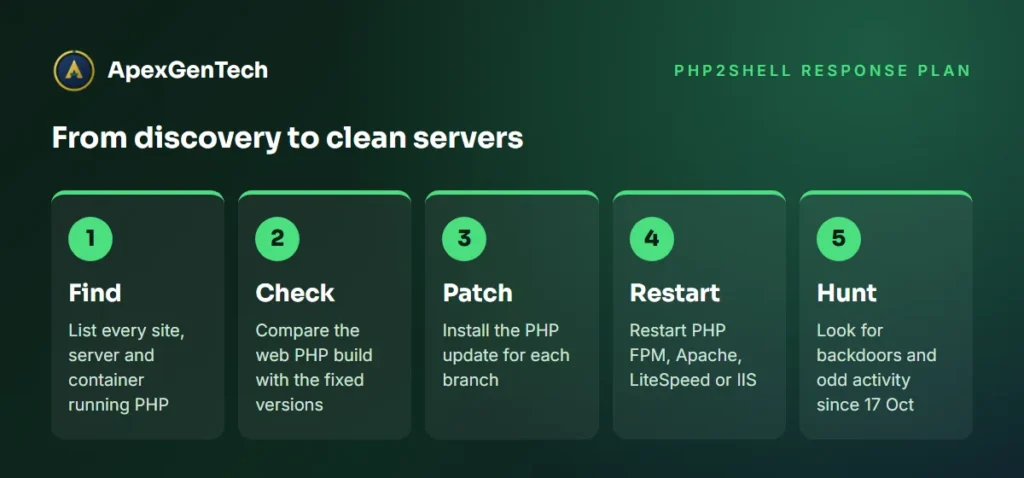
Short answer: update PHP to 8.5.12, 8.4.27, 8.3.36 or 8.2.35 (or a newer release), restart every PHP process, and then check the server for signs of a break in that may have happened before you patched. Updating WordPress or its plugins does not fix PHP2Shell, because the flaw is in PHP, not in WordPress.
What is PHP2Shell?
PHP2Shell is a chain of two memory safety bugs inside the PHP engine. They were found by researchers at Calif and Wiz with the help of AI code analysis tools, and the details leaked online a day before the planned release. That leak is why the PHP update came out under so much pressure, and why so many organisations reacted at the same time.
The two flaws are:
- CVE-2026-109618, out of memory corruption. If a request makes PHP run out of memory while it is still reading the incoming data, part of that data is left half built. The clean up code then treats the half built data as valid. Researchers showed this can be triggered with a single POST request that contains one extremely long form field name.
- CVE-2026-109619, stale global state. Some data from one request is not cleared properly, so a later request handled by the same PHP worker can reach memory that has already been freed. This path uses the session upload progress feature, which is switched on by default.
PHP rates both bugs at 9.2 out of 10 (critical) on the CVSS 4.0 scale. Early reports that circulated before the release carried a score of 10, which the PHP Foundation later said was wrong. Either way, this is a PHP vulnerability that any attacker on the internet can try against your site without a password.
Why the PHP2Shell vulnerability is so serious
Most website security problems sit in one plugin or one application. PHP2Shell is different because it sits in the language that runs the application. That has four big consequences.
- No login is needed. An attacker only has to send web requests to your site.
- Your own code does not matter. With Apache and mod_php, the PHP team says the attack can work before any of your application code runs. A perfectly patched WordPress site on a vulnerable PHP build is still exposed.
- The bug is old. Researchers say the faulty code path goes back to PHP 5.4, released in 2012, so old forgotten servers are affected too.
- Attackers moved fast. Amazon reported attempts against its honeypots from 17 October, four days before the public release. Cloudflare said it saw attempts grow from thousands to millions within hours of the announcement, and it has added free web application firewall rules for all plans.
The reaction matched the risk. The BBC reported that Wikimedia, the Finnish government, several Scottish councils and health boards, and the Dutch cyber security agency took websites offline as a precaution. The US NSA, the UK National Cyber Security Centre and agencies in the EU, Singapore and Australia all told organisations to patch PHP at once or pull PHP systems offline until they can. In the US, CISA’s PHP2Shell alert asks every organisation to find all PHP systems and patch internet facing ones first.
Reports on active exploitation differ. Amazon and watchTowr say they have seen real attacks, while the PHP team said it had not confirmed a working public exploit at release time, and CISA had not added the flaws to its Known Exploited Vulnerabilities list as of 22 October. Several fake “exploit” scripts are circulating that may contain malware, so do not run them. The safe assumption is simple: treat every unpatched PHP server as a target.
PHP versions affected by PHP2Shell
Every PHP installation that serves web requests is in scope, whatever way PHP is connected to the web server. The PHP team lists PHP FPM, Apache mod_php, php-cgi, LiteSpeed (LSAPI) and FrankenPHP. The command line version of PHP that runs scheduled scripts is lower risk, but it usually shares the same package, so it gets fixed in the same PHP update.
Here is where each PHP branch stands:
- PHP 8.5: versions before 8.5.12 are vulnerable. Fixed in 8.5.12.
- PHP 8.4: versions before 8.4.27 are vulnerable. Fixed in 8.4.27.
- PHP 8.3: versions before 8.3.36 are vulnerable. Fixed in 8.3.36.
- PHP 8.2: versions before 8.2.35 are vulnerable. Fixed in 8.2.35.
- PHP 7.4, 8.0 and 8.1: vulnerable, with no official PHP release. The PHP team published small source patches, and Linux distributions or long term support vendors may ship fixed packages. CISA advises taking these systems offline if you cannot patch them.
- PHP 7.3 and older, including PHP 5: vulnerable with no fix at all. The only real answer is moving to a supported branch.
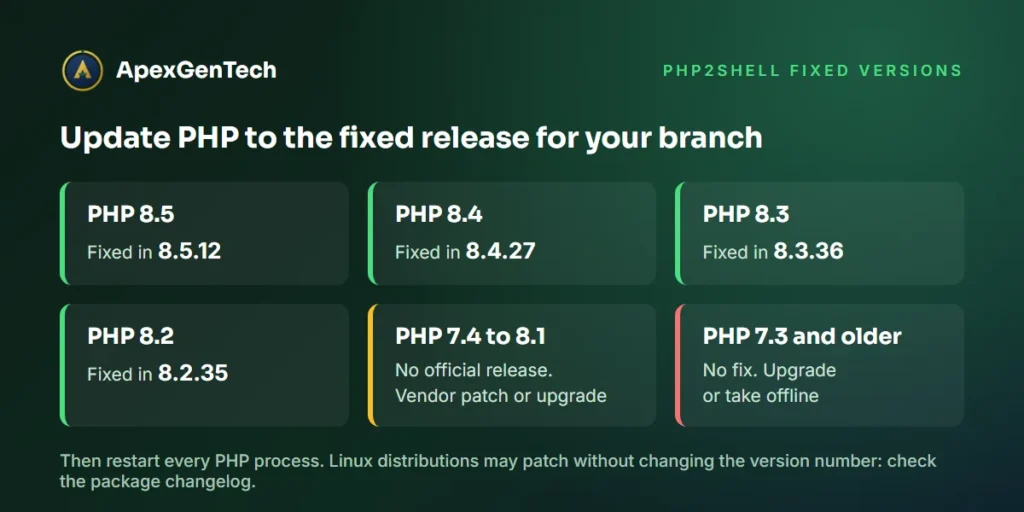
One important detail for Linux users: distributions such as Debian, Ubuntu, Red Hat, AlmaLinux and Rocky Linux often fix bugs inside their own packages without changing the main version number. Your server may report PHP 8.1.2 and still be patched, or report 8.3.6 and be patched by the vendor. That is why the Linux checks below look at the package changelog, not only the version number. The official PHP security advisory and your vendor’s notice are the final word.
How to check if your server is affected by PHP2Shell
Answer these four questions for every website and server you own. A single forgotten staging site or old intranet page is enough for an attacker.
1. Do you run PHP anywhere?
Make a list of every site, server, container and appliance. PHP often hides inside other products, such as control panels, monitoring tools, help desks, file sharing portals and security appliances, so ask your vendors too. If a site is built with WordPress, WooCommerce, Drupal, Joomla, Magento, Moodle, Laravel or Symfony, it runs PHP.
2. Which PHP version serves the website?
The version that matters is the one the web server uses, which can be different from the version you see on the command line. In WordPress, open Tools > Site Health > Info > Server to see it. On a server you control, compare the command line version with the PHP FPM or Apache module version, as shown in the Linux and Windows sections below. Never leave a phpinfo test page on a public site.
3. Is the PHP build patched?
Your version should be equal to or newer than the fixed release for its branch, or your vendor’s changelog should list CVE-2026-109618 and CVE-2026-109619. If you use shared or managed hosting, ask your host in writing whether the PHP2Shell fix is applied to the PHP version your site uses.
4. Were you attacked before you patched?
Patching stops new attacks, but it does not remove a backdoor that someone planted earlier. Security teams advise reviewing activity from 17 October 2026 onwards. Look for these warning signs:
- PHP memory errors that say “Allowed memory size exhausted” with “Unknown on line 0”, which point to failed attempts.
- Apache log lines with code AH00052, meaning a child process crashed with a signal such as a segmentation fault.
- Unusually large POST requests, often several megabytes, in proxy, CDN or firewall logs, especially to normal pages that never receive uploads.
- Web server or PHP processes (apache2, httpd, php-fpm, php-cgi, lsphp or php-cgi.exe) starting shells, PowerShell, curl, wget or certutil.
- New PHP files in upload, cache or temp folders, new admin accounts, new scheduled tasks or cron jobs, and outbound connections to unknown addresses.
A quiet log is not proof of safety, because a successful PHP2Shell attack can return a normal page and leave no error. If any server was exposed and unpatched for days, a proper security audit of that server is worth the time.
How to fix PHP2Shell on WordPress sites
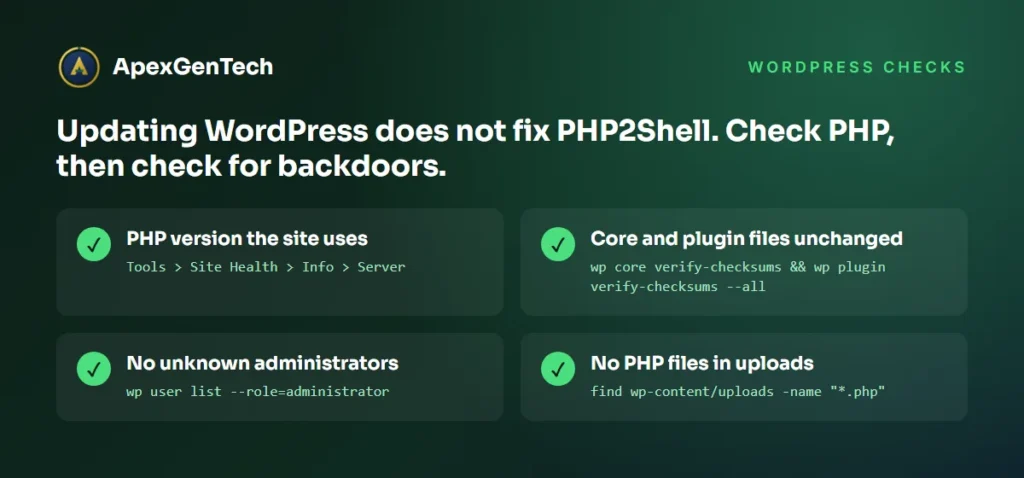
WordPress security normally means updating core, themes and plugins. PHP2Shell is different. As the BBC’s advice to small businesses puts it, the fix must be applied to PHP itself, and updating WordPress or its plugins will not solve it. Follow the steps for your type of hosting.
WordPress on shared or managed hosting
- Open Tools > Site Health > Info > Server and note the PHP version.
- Log in to your hosting panel (cPanel, Plesk, hPanel or similar) and find the PHP version setting. If your site is on PHP 8.1 or older, switch to PHP 8.3 or 8.4, but test first on a staging copy because old plugins can break.
- Contact your host and ask: “Has the PHP2Shell fix for CVE-2026-109618 and CVE-2026-109619 been applied to the PHP version my site uses, and on what date?” Keep the answer for your records.
- If your host has not patched and your site handles payments or customer data, consider maintenance mode or putting the site behind Cloudflare with its PHP2Shell rules turned on until the host confirms.
WordPress on your own server or VPS
Update PHP using the Linux or Windows steps below, restart PHP, and then run these WordPress checks with WP CLI from the site folder:
wp core verify-checksums
wp plugin verify-checksums --all
wp user list --role=administrator
wp cron event list
find wp-content/uploads -name "*.php"
Core or plugin files that fail the checksum test, administrators you do not recognise, odd cron events and any PHP file inside the uploads folder all need a closer look. Uploads should only contain images and documents.
After patching WordPress hosting
- Change administrator passwords and turn on two factor sign in.
- Generate new security keys and salts in wp-config.php, which signs everyone out.
- Change the database password and any API keys stored on the server if you find signs of a break in.
- Restore from a clean backup taken before 17 October if you find files you cannot explain. Our guide to the 3 2 1 backup rule explains how to keep backups you can trust.
How to fix PHP2Shell on Linux servers
Linux servers are where most PHP runs, and they are the main PHP2Shell target. Work through these steps on each server, starting with the ones that face the internet.
Step 1: Find every PHP version on the server
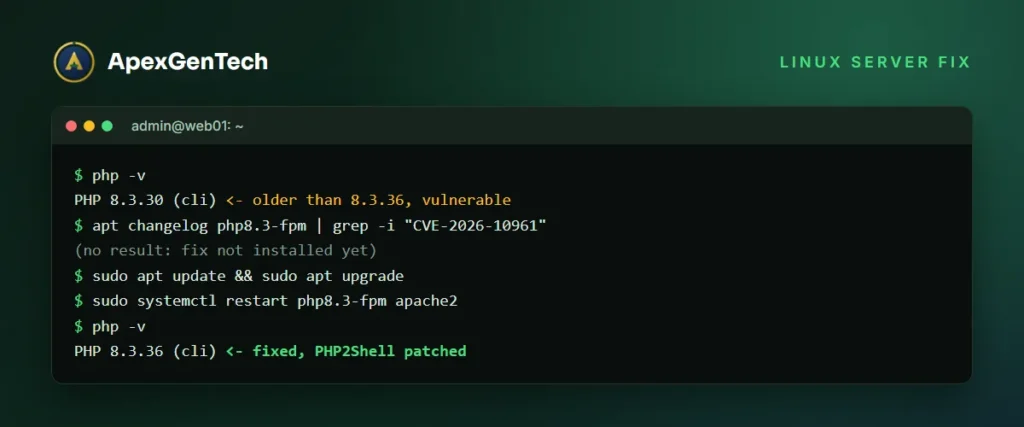
php -v
ls /usr/sbin/php-fpm* /usr/bin/php* 2>/dev/null
ps aux | grep -E "php-fpm|lsphp|httpd|apache2" | grep -v grep
dpkg -l | grep -i php        # Debian and Ubuntu
rpm -qa | grep -i php        # Red Hat, AlmaLinux, Rocky, CentOS
Many servers run more than one PHP version side by side, for example PHP 8.1 FPM for an old site and PHP 8.3 FPM for a new one. Each one needs fixing.
Step 2: Check whether the packages already contain the fix
apt changelog php8.3-fpm | grep -i "CVE-2026-10961"     # Debian and Ubuntu
rpm -q --changelog php-fpm | grep -i "CVE-2026-10961"   # Red Hat family
If the changelog mentions CVE-2026-109618 and CVE-2026-109619, the package is patched even if the version number looks old. If nothing appears, install the update.
Step 3: Install the PHP update
# Debian and Ubuntu (including the Ondrej Sury PPA)
sudo apt update && sudo apt upgrade

# Red Hat, AlmaLinux, Rocky Linux
sudo dnf upgrade "php*"

# cPanel servers with EasyApache 4
sudo dnf upgrade "ea-php*"      # or yum on older systems
If you compiled PHP from source, rebuild from the fixed release. If you use Docker, rebuild your images from fixed official tags, such as php:8.3.36-fpm or php:8.4.27-apache, and redeploy. Pulling the same old tag again does not help, and long running containers keep the old code until they are replaced.
Step 4: Restart every PHP process
Running PHP workers keep the old code in memory until they restart. This is the step people most often forget.
sudo systemctl restart php8.3-fpm      # repeat for each FPM version
sudo systemctl restart apache2         # or httpd, needed for mod_php
sudo systemctl restart lsws            # LiteSpeed Enterprise
sudo /usr/local/lsws/bin/lswsctrl restart   # OpenLiteSpeed
Then confirm with php -v and with Site Health or your application’s status page that the web server now reports the fixed build.
Step 5: Temporary protection if you cannot patch today
The PHP team is clear that updating is the only complete fix and no setting fully protects you. If you must wait a few hours, these settings reduce the risk. Put them in the PHP FPM pool or the main php.ini so applications cannot change them, then restart PHP:
; reduces the CVE-2026-109619 path
php_admin_flag[session.upload_progress.enabled] = off
; PHP 8.5 only
php_admin_flag[fatal_error_backtraces] = off
; reduces the CVE-2026-109618 path, only together with request size limits
php_admin_value[memory_limit] = -1
; optional for FPM: each worker handles one request, slower but safer
pm.max_requests = 1
Removing the memory limit only makes sense if the web server or proxy limits request size, for example client_max_body_size in Nginx or LimitRequestBody in Apache, and the container or service has a memory cap. Otherwise one large request could use up all the memory. Add a web application firewall rule as well, and limit access to the site by IP address if it is only used internally. These are short term measures, not a replacement for the PHP update.
Step 6: Hunt for signs of compromise
grep -E "AH00052|Unknown on line 0" /var/log/apache2/error.log* /var/log/httpd/error_log* 2>/dev/null
find /var/www /tmp /var/tmp -name "*.php" -newermt "2026-10-17" 2>/dev/null
ps -ef --forest | grep -B2 -E "sh -c|bash|curl|wget"
crontab -l -u www-data; ls -la /etc/cron.*
Check the results by hand. New PHP files in temp folders, shells whose parent is a web process, and cron jobs you did not create are the main warning signs. If you find any of them, isolate the server and treat it as an incident.
How to fix PHP2Shell on Windows servers
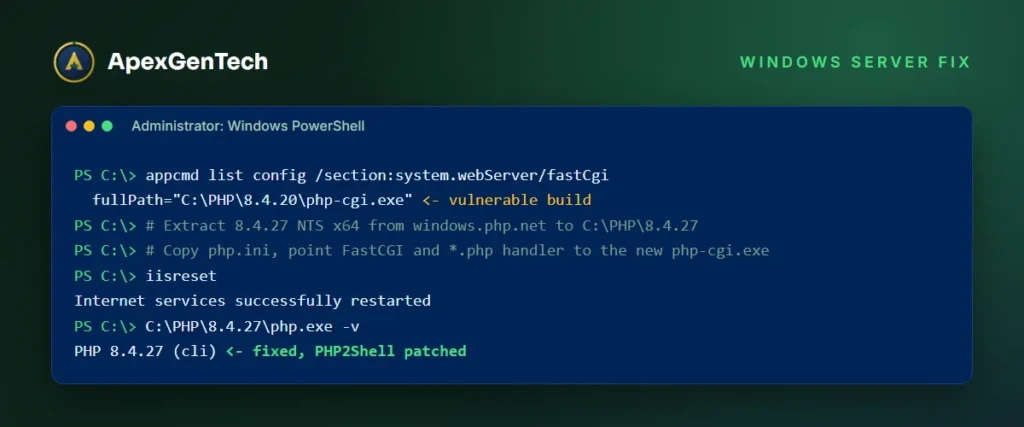
PHP on Windows usually runs under IIS through FastCGI using php-cgi.exe, or inside bundles such as XAMPP, WAMP and Laragon. Windows has no package manager update for PHP in most setups, so the fix is a manual replacement.
Step 1: Find PHP on the server
Open PowerShell as administrator and run:
php -v
where.exe php
Get-ChildItem C: -Recurse -Filter php-cgi.exe -ErrorAction SilentlyContinue | Select-Object FullName
& "$env:windirsystem32inetsrvappcmd.exe" list config /section:system.webServer/fastCgi
The last command shows which php-cgi.exe IIS actually uses. That is the copy you must replace. There may be several copies, so check each site’s handler mapping in IIS Manager.
Step 2: Download the fixed build
Download the fixed release for your branch (8.5.12, 8.4.27, 8.3.36 or 8.2.35, or newer) only from the official PHP for Windows download page. For IIS with FastCGI, choose the Non Thread Safe (NTS) build with the same architecture (x64) as your current one. Never download PHP from mirrors or “fix tools” shared on social media, because unverified PHP2Shell scripts are circulating and may carry malware.
Step 3: Replace PHP and restart IIS
- Extract the new build to a new folder, for example C:PHP8.3.36.
- Copy your existing php.ini and any extra extensions (such as SQL Server drivers) into the new folder. Extensions must match the new version.
- In IIS Manager, point the FastCGI application and the *.php handler mapping to the new php-cgi.exe, or stop IIS and replace the files in the old folder.
- Run
iisresetso every php-cgi.exe process restarts. - Confirm the new version with
php -vand on the site itself.
For XAMPP, WAMP or Laragon, install the newest release of the bundle that includes a fixed PHP, or add the fixed PHP build as a new version in the bundle’s PHP switcher, then restart Apache. Development machines that are reachable from the network need this too.
Step 4: Check Windows for signs of attack
Get-CimInstance Win32_Process |
  Where-Object { (Get-Process -Id $_.ParentProcessId -ErrorAction SilentlyContinue).Name -eq "php-cgi" } |
  Select-Object Name, CommandLine
Get-ChildItem C:inetpub -Recurse -Include *.php -ErrorAction SilentlyContinue |
  Where-Object LastWriteTime -gt "2026-10-17"
Get-ScheduledTask | Where-Object Date -gt "2026-10-17"
Get-LocalGroupMember Administrators
Any cmd.exe, powershell.exe, certutil.exe or curl.exe started by php-cgi.exe is a strong warning sign. So are new scheduled tasks and new local administrators. If you use Microsoft Defender for Endpoint or another EDR tool, search for web shell and “process spawned by web server” alerts from 17 October onwards.
PHP2Shell on containers, cloud and control panels
Cloud platforms and managed services patch at different speeds, so check each one rather than assuming.
- Docker and Kubernetes: scan images for PHP versions, rebuild from fixed base images, and roll out new pods. Official WordPress, Drupal and Joomla images were shown vulnerable by Wiz, so check their tags.
- Cloud app services: AWS, Azure and Google Cloud managed PHP runtimes are usually patched by the provider, but you may need to restart or redeploy the app to pick up the new runtime.
- Control panels: cPanel, Plesk, DirectAdmin and CloudPanel ship their own PHP builds. Run the panel’s update and confirm each PHP version it offers is fixed.
- Appliances and vendor software: help desks, monitoring tools and firewalls with PHP web consoles need vendor patches. Restrict their admin pages to internal networks until they are patched.
Vulnerability scanners help here. Tenable, for example, has added PHP2Shell checks, and tools such as Aikido and IBM Concert can show where vulnerable PHP versions sit across code, containers and servers. A scanner is only as good as its asset list, though, so start with an honest inventory.
PHP2Shell response checklist for business owners
If you are not technical, hand this checklist to your developer, host or IT partner and ask for a written answer to each point.
- List every website and system we own that uses PHP, including old and test sites.
- Confirm each one is on a fixed PHP build, with the date it was patched.
- Confirm all PHP processes were restarted after the PHP update.
- Move any site on PHP 8.1 or older to a supported version, or take it offline.
- Check each site for backdoors, new admin users and unknown files from 17 October onwards.
- Change passwords and keys on any server that shows signs of a break in.
- Keep a clean, tested backup and a plan for the next critical PHP vulnerability.
Also warn your staff and customers about phishing. Security researchers expect criminals to use the news for fake “urgent PHP2Shell patch” emails and messages that lead to malware or password theft. Security awareness training matters as much as the patch itself.
What PHP2Shell teaches about website security
PHP2Shell is a reminder that a website is not only its content system. It sits on a language runtime, a web server, an operating system and a hosting platform, and each layer needs updates. The companies that patched in hours this week had three things in place: an up to date list of their systems, a tested way to update PHP, and someone responsible for doing it.
The bug also shows how AI is changing security work. The same AI tools that found flaws hidden for more than a decade can help attackers turn the published details into working attacks faster. That means the time between a fix and real attacks keeps getting shorter. Regular patching, a web application firewall in front of public sites and periodic penetration testing are now basic hygiene, not extras. If you are planning a test, our article on penetration testing cost explains what drives the price.
PHP2Shell FAQs
What is PHP2Shell?
PHP2Shell is the name for two critical flaws in the PHP language, CVE-2026-109618 and CVE-2026-109619, disclosed on 21 October 2026. They can let an attacker who is not logged in run code on a web server that uses PHP.
Does updating WordPress fix PHP2Shell?
No. The flaw is in PHP, not WordPress. You or your host must update PHP to a fixed version and restart it. Updating WordPress, themes and plugins is still good practice, but it does not close this hole.
Which PHP versions fix PHP2Shell?
PHP 8.5.12, 8.4.27, 8.3.36 and 8.2.35, or newer releases. PHP 7.4 to 8.1 only have vendor patches, and PHP 7.3 and older have no fix, so they need an upgrade.
How do I know if my website was hacked through PHP2Shell?
Look for new PHP files in upload or temp folders, unknown admin users, new cron jobs or scheduled tasks, shells started by web server processes, and large unusual POST requests since 17 October 2026. If anything looks wrong, isolate the server and get a security review.
Is Cloudflare or a firewall enough to stop PHP2Shell?
No. Firewall rules from Cloudflare and others block known attack patterns and buy time, but they only protect traffic that passes through them and can be bypassed by new variants. Updating PHP is the only complete fix.
Should I take my website offline?
If you cannot patch PHP quickly, or you run PHP 8.1 or older, government agencies including CISA and the UK NCSC advise taking the site offline until it is fixed. A short planned outage costs far less than a breach.
Need help with PHP2Shell? Our cybersecurity team can check your servers, apply the PHP update, hunt for backdoors and confirm your sites are clean, for WordPress, Linux and Windows. Contact us today and tell us how many sites and servers you run. Further reading: Tenable’s PHP2Shell FAQ and the BBC’s explainer on the global response.