Cyber Essentials certification is the UK government backed baseline for cyber security, and in 2026 it matters more than ever. Many public sector and defence contracts ask for it, insurers ask about it, and larger customers now put it in their supplier questionnaires. The good news is that the scheme is built for ordinary businesses. You do not need a security team to pass, but you do need to prepare properly, because the rules became stricter in April 2026.
This guide explains what Cyber Essentials certification covers, what changed this year, what it costs, how Cyber Essentials Plus differs, and seven practical steps to pass first time. It is written for UK companies and for firms in Canada, the Gulf and Pakistan that sell to UK customers and have been asked for a certificate.
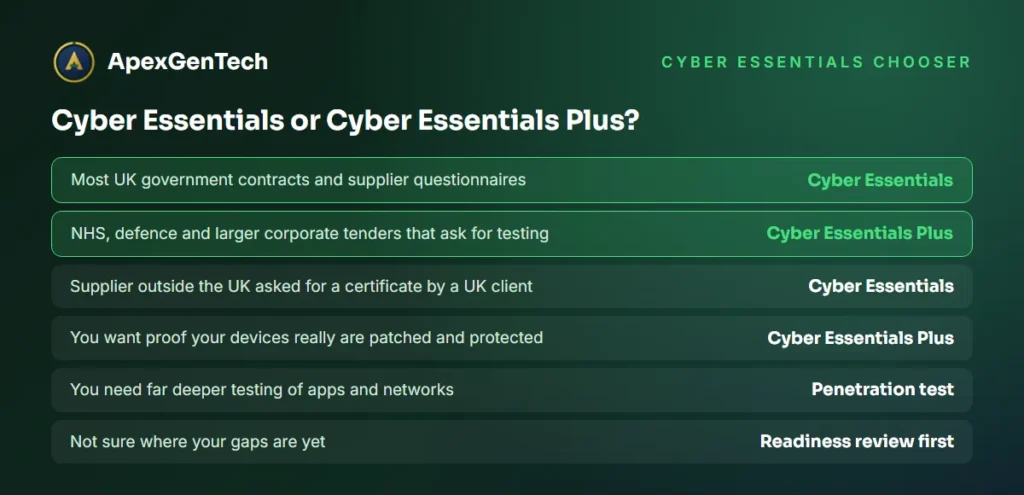
What is Cyber Essentials certification?
Cyber Essentials is a scheme run by the UK National Cyber Security Centre (NCSC), with IASME as its delivery partner. It checks that an organisation has five basic technical controls in place, the controls that stop most common attacks such as phishing, password guessing and the exploitation of old, unpatched software.
There are two levels:
- Cyber Essentials: a self assessment. You answer an online question set about your IT, a senior person signs it off, and an assessor from an IASME licensed certification body marks it.
- Cyber Essentials Plus: the same controls, but an assessor tests them on your actual devices and accounts, with vulnerability scans and checks on a sample of laptops, phones and cloud accounts.
A certificate lasts 12 months. After that you renew by completing the current question set again. Read the official scheme pages from the NCSC Cyber Essentials overview before you start, and keep them open while you answer.
Who needs Cyber Essentials certification?
For many companies the question is not whether Cyber Essentials certification is useful, but who is asking for it:
- UK government suppliers: central government contracts that handle personal data or provide certain IT services have required Cyber Essentials since 2014, and the Ministry of Defence asks for it in its supply chain.
- NHS and local authority suppliers: many health and council tenders ask for Cyber Essentials, and some ask for Cyber Essentials Plus.
- Suppliers to large companies: banks, insurers and manufacturers increasingly put it in supplier onboarding questionnaires.
- Companies buying cyber insurance: the questions insurers ask about MFA, patching and backups overlap heavily with the scheme.
- Firms outside the UK: a company in Canada, the UAE or Pakistan can get Cyber Essentials certification too if a UK client asks for it. The scheme is open to organisations anywhere.
Even if nobody has asked yet, the five controls are a sensible minimum for any business. Our cybersecurity services use the same controls as the starting point for clients in all seven countries we work in.
What changed in the Cyber Essentials assessment in April 2026
Assessment accounts created from 27 April 2026 use version 3.3 of the requirements, called Cyber Essentials Requirements for IT Infrastructure. If you passed a year ago, do not assume you will pass again with the same answers. The main changes are:
- MFA on cloud services is now an automatic fail if missing. Every cloud service your staff use for work, whether free, included in another product or paid for, must have MFA switched on wherever the service offers it. There is no partial credit for covering most of them.
- Cloud services cannot be excluded from scope. The requirements now define cloud services formally, and they are always in scope.
- Scope is wider. Any device that connects to the internet and is used for work is in scope. If you leave part of your network out, you must explain why and show it is properly separated.
- Passwordless sign in is encouraged. The user access control section now points towards passkeys and MFA rather than long password rules alone.
- Stricter checks on updates. Assessors look harder at whether critical and high risk updates really are installed within 14 days, and commentators report that the patching questions now carry an automatic fail too.
Applicants have six months from creating their account to complete the assessment. If your renewal is due, check which question set your account uses before you start. IASME publishes the current documents on the IASME Cyber Essentials page.
The five Cyber Essentials controls explained
Every Cyber Essentials assessment checks the same five technical controls. Here is what each one means in plain terms.
1. Firewalls for Cyber Essentials certification
Every device must sit behind a firewall, either the one in your office router or the software firewall on the laptop itself. Default admin passwords on routers must be changed, remote admin access to the firewall must be off or tightly limited, and any open ports must have a business reason written down.
2. Secure configuration under Cyber Essentials
Remove software and accounts you do not need, change every default password, turn off auto run for USB drives and make sure devices lock after a short idle time. Phones and tablets need a PIN or biometric lock.
3. Security update management for Cyber Essentials
All software must be licensed and supported by its maker. Critical and high risk security updates must be installed within 14 days of release. Software that no longer gets updates, such as Windows 10 without extended updates or an old server operating system, must be removed or isolated. Our article on the PHP2Shell fix shows how quickly an unpatched server becomes a real risk.
4. User access control and MFA
Every person has their own account, admin rights are given only to people who need them and only used for admin work, and accounts are removed when people leave. MFA must protect every cloud service where it is offered. Passkeys and authenticator apps are preferred over text messages.
5. Malware protection for Cyber Essentials certification
Every laptop, desktop and server needs malware protection, normally the antivirus built into Windows or macOS or a managed endpoint product, set to update itself and scan files when they are opened. Phones can rely on installing apps only from the official stores.

Why companies fail the Cyber Essentials assessment
Most failures come from a handful of gaps that are easy to fix once you know about them:
- A cloud service without MFA. Usually something small: a marketing tool, the accounting software, a domain registrar or a shared social media login.
- Unsupported software. One old PC on Windows 10, an out of date browser or a server nobody remembers.
- Late updates. Updates that are approved but not installed within 14 days, often on laptops that are rarely switched on.
- Staff working as admins. People using an admin account for email and browsing every day.
- Personal devices. Staff reading work email on their own phones without a lock screen or with an old operating system.
- Vague answers. Answers like “yes, we think so” or missing details. Assessors need specifics: operating system versions, firewall makes and how updates are applied.
A short internal review before you submit catches almost all of these. That is exactly what our cyber security audit does when a client is preparing for Cyber Essentials certification.
Cyber Essentials Plus: what the assessor tests
Cyber Essentials Plus uses the same five controls but checks them in practice. You must pass the basic Cyber Essentials assessment first, and the Plus audit must normally be completed within three months of that certificate. The assessor will usually:
- Run an external vulnerability scan of your internet facing systems.
- Scan a sample of laptops, desktops and servers for missing updates.
- Test that malware protection blocks harmful files and links sent by email and the web.
- Check that MFA is enforced on a sample of user accounts and cloud services.
- Confirm that admin rights are limited on the sampled devices.
If sampled devices fail because of missing patches, assessors now test a further sample as well, so fixing only the devices you know will be checked does not work. Plus is the level many NHS, defence and larger corporate buyers ask for. If you also need deeper testing, our penetration testing services go far beyond the Plus checks.

How much does Cyber Essentials certification cost?
The fee for the basic Cyber Essentials assessment is set by IASME and depends on the size of your organisation. At the time of writing it starts at roughly £300 plus VAT for micro businesses and rises in steps for small, medium and large organisations. Check the current fee with your certification body when you book, because it changes from time to time.
Cyber Essentials Plus is priced by each certification body, based on how many devices, sites and cloud services must be sampled. For a small office it usually starts at well over a thousand pounds, and it rises with size and complexity.
The fee is rarely the biggest cost. The real work is fixing gaps: replacing old laptops, switching on MFA everywhere, setting up automatic updates and tidying admin rights. For many small firms the simplest route is a modern licence that bundles these controls. Microsoft 365 Business Premium, for example, includes device management, Conditional Access for MFA and endpoint protection that cover most of the five controls.
| Cost item | Cyber Essentials | Cyber Essentials Plus |
|---|---|---|
| Assessment fee | Fixed fee by organisation size, set by IASME | Quoted by the certification body |
| Who checks | Assessor marks your answers | Assessor tests your devices and accounts |
| Typical preparation | MFA, updates, admin rights, old devices | Same, plus proof on every sampled device |
| Valid for | 12 months | 12 months |
7 steps to pass Cyber Essentials certification first time
- Agree the scope. Decide whether you certify the whole organisation or a separated part. Whole organisation is simplest and is what most buyers expect.
- List every device and cloud service. Laptops, desktops, servers, phones, tablets, routers and every cloud service used for work, including small ones.
- Switch on MFA everywhere it is offered. Start with email and Microsoft 365 or Google Workspace, then finance, HR, marketing and domain tools.
- Remove or replace unsupported software. Upgrade or retire old operating systems, browsers and applications.
- Automate updates. Use a device management tool so critical and high risk updates land within 14 days, with a report to prove it.
- Tidy admin rights and accounts. Separate admin accounts, remove leavers and shared logins, and change any default passwords.
- Answer the question set carefully. Give specific answers with versions and product names, and have a senior person review them before you submit.
Most offices of 10 to 50 people can work through these steps in two to six weeks, depending on how many old devices need replacing. Staff awareness helps too: our cybersecurity training for employees covers the phishing and password habits the scheme assumes.

Cyber Essentials certification for remote and hybrid teams
Home working is where many Cyber Essentials assessments go wrong, because the devices are out of sight. The rules are clear once you know them:
- Company laptops at home are in scope. They must meet every control wherever they are used, including the software firewall, updates and malware protection.
- Home routers are usually out of scope for company laptops, because the laptop’s own firewall does the job. That is why the software firewall on every laptop must be switched on and cannot be turned off by the user.
- Personal phones and laptops used for work are in scope if they access company email or data. They need a supported operating system, a screen lock and current updates. If you cannot control them, provide company devices or limit access with Conditional Access rules.
- Remote access tools must be patched and protected by MFA. This includes VPNs, remote desktop gateways and support tools.
- Cloud services cover everyone. MFA has to apply to home and office sign ins alike.
The easiest way to keep a hybrid team compliant is a device management tool that applies the same settings to every laptop and phone, wherever it is, and reports which devices are missing updates. With that in place, renewing your Cyber Essentials certification each year becomes a short review rather than a scramble.
Backups are not one of the five controls, but the requirements now mention them early on, and assessors and insurers will ask. Follow the 3 2 1 backup rule so a ransomware attack on a home laptop does not become a lost week.
How ApexGenTech helps with your Cyber Essentials assessment
We prepare companies for Cyber Essentials certification and Cyber Essentials Plus; the assessment itself is carried out by an IASME licensed certification body of your choice. Our work covers the gaps that usually cause a fail:
- A readiness review against the current requirements, with a short written list of fixes.
- MFA rollout across Microsoft 365, Google Workspace and your other cloud services.
- Device management so updates are automatic and provable.
- Replacement of unsupported devices and software through our software licensing team.
- Help writing clear, specific answers to the question set.
- Ongoing IT support services so you stay compliant between renewals.
We work with companies across the UK through our UK team, and with firms in Canada, the Gulf and Pakistan that supply UK customers.

Cyber Essentials certification FAQs
How long does Cyber Essentials certification take?
The basic Cyber Essentials assessment is usually marked within a few working days of submission. Preparation takes longer: most small offices need two to six weeks to fix gaps such as MFA, updates and old devices before they apply.
Is MFA mandatory for Cyber Essentials?
Yes. Under the requirements in force since April 2026, MFA must be switched on for every cloud service where it is available. A cloud service without MFA is an automatic fail.
What is the difference between Cyber Essentials and Cyber Essentials Plus?
Cyber Essentials is a self assessment marked by an assessor. Cyber Essentials Plus tests the same controls on your real devices and accounts with scans and sample checks, and must normally be completed within three months of the basic certificate.
How long is a Cyber Essentials certificate valid?
Cyber Essentials certification is valid for 12 months. To stay certified you complete the current question set again before the certificate expires, and Cyber Essentials Plus must be retested each year as well.
Can a company outside the UK get Cyber Essentials certification?
Yes. Organisations anywhere can apply through an IASME licensed certification body. Suppliers in Canada, the UAE, Saudi Arabia, Qatar and Pakistan often do so when a UK client asks for the certificate.
Can I recommend a Cyber Essentials assessment provider?
IASME lists every licensed certification body on its website. Choose one with experience of companies your size, ask what is included in the Plus audit, and get your gaps fixed before you book so the fee is paid only once.
Want to know how close you are to passing? Book a free Cyber Essentials readiness call and we will go through your devices, cloud services and MFA with you and send a short list of fixes.