The best asset tracking software tells you in seconds what you own, who has it, where it is and when its warranty, licence or service contract runs out. Without it, companies lose laptops when people leave, miss warranty claims, pay for licences nobody uses and buy equipment they already have in another building.
We compared 10 popular tools for tracking IT equipment, machines, tools, vehicles and software licences, with honest pros and cons for each, a comparison table and a simple way to choose. Our pick for most companies is Nexora Asset Management, because it keeps every asset type in one register and links it to the help desk, maintenance and the site gate. A note on fairness: ApexGenTech builds Nexora and resells ManageEngine, so we have an interest. We have kept the pros and cons honest, including Nexora’s own limits, so you can judge for yourself.
What is asset tracking software?
Asset tracking software keeps a single, live register of the things a company owns. Each asset gets a record with a unique code, category, location, owner, purchase date, cost, warranty and history. A QR code or barcode label on the asset opens that record from a phone, so audits and handovers take minutes instead of days.
The tools in this guide fall into four groups:
- General asset trackers for equipment, tools and furniture across many locations.
- IT asset management tools that also scan the network for computers and track software licences.
- Inventory apps that are best at counting stock and supplies.
- Operations platforms where assets sit next to help desk, maintenance and safety records.
How we chose the best asset tracking software
- Asset types: can one register hold laptops, machines, vehicles, safety equipment and software licences?
- Labels and scanning: QR or barcode labels that open the record from any phone.
- Dates and reminders: warranty, support, end of life and contract alerts before they pass.
- History: who held the asset, what broke and what was spent on it.
- Connections: links to help desk tickets, maintenance work orders and purchasing.
- Total cost: licences, labels, setup and admin time over three years.
- Setup and support: who imports your existing list, and who helps when you are stuck.
Prices change often, so we describe each pricing model rather than quoting numbers. Confirm current prices on the vendor’s own website before you buy.
Best asset tracking software comparison table
| Tool | Best for | Free option | Pricing model |
|---|---|---|---|
| Nexora Asset Management | Every asset type, linked to help desk, maintenance and gate | Free demo on your own asset list | Quote per company |
| Asset Panda | Highly configurable standalone tracking | Free trial | Custom quote |
| EZOfficeInventory | Equipment check in and check out at scale | 14 day free trial | By number of items, unlimited users |
| Snipe IT | IT teams happy to self host | Free open source | Free to self host, hosted plans by tier |
| ManageEngine AssetExplorer | IT assets with network discovery | Trial, then a free edition | By number of assets |
| Freshservice | IT assets inside a full ITSM suite | 14 day free trial | Per agent plus asset packs |
| GoCodes | Construction and field equipment | Free trial | Quote, labels and training included |
| Sortly | Small teams tracking inventory and tools | Free plan for 100 items | Tiers by items and users |
| Asset Infinity | Assets plus maintenance and depreciation | 14 day free trial | Register by asset count, modules per user |
| Futuresol | Companies already on Futex apps in Pakistan and the Gulf | Demo on request | Quote |
The 10 best asset tracking software tools in 2026
1. Nexora Asset Management: best asset tracking software overall
Nexora Asset Management keeps IT equipment, machines, vehicles, safety equipment, furniture and software licences in one register. Every asset gets an automatic code by category, and a check stops the same serial number being entered twice. QR labels open the record from any phone, so audits and handovers are quick.
The register watches dates for you. The right person is reminded 90, 30, 7 and 1 day before a warranty, support contract, end of life or licence renewal date. Software licence seats are tracked per device, user, site or subscription, licence keys are stored encrypted, and every time someone reveals a key it is recorded by name and time.
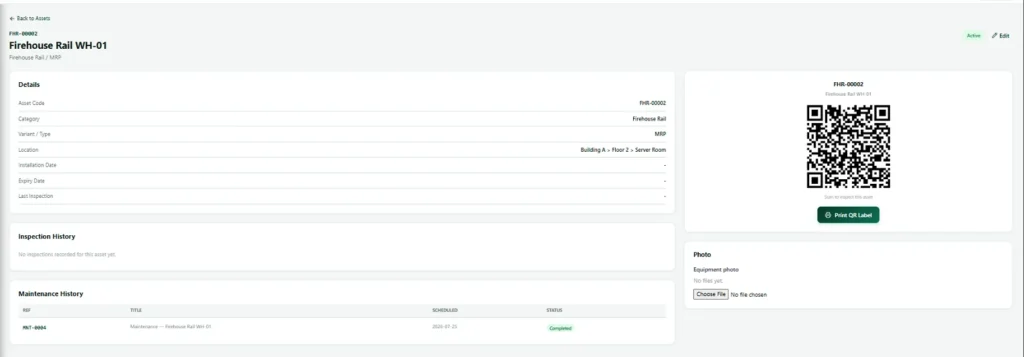
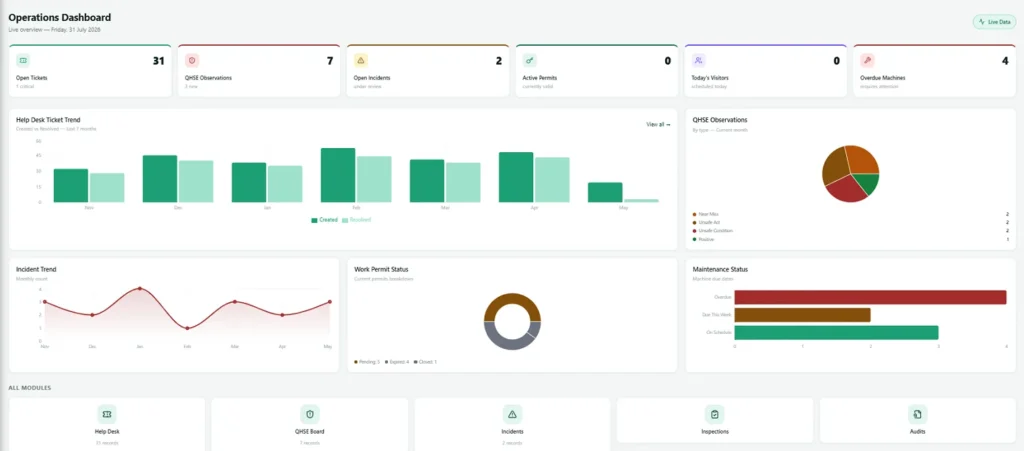
What makes it different is the connection to the rest of the platform. A broken laptop raised on the help desk links to its asset record, preventive maintenance jobs sit on the same history, and vendor service visits are counted when the technician checks in at the gate, so you can question an invoice with facts.
Pros
- One asset register for IT, machines, vehicles, safety equipment and licences.
- Reminders before warranty, support, end of life and renewal dates.
- Licence keys encrypted, with every reveal recorded.
- Help desk tickets, maintenance jobs and gate visits linked to each asset.
- Excel import and setup done for you, with support in Canada, the UK, the Gulf and Pakistan.
Cons
- No public price list; you get a written quote.
- No permanent free plan and no open source edition.
- No built in network discovery agent; computers come in from Excel or a remote monitoring export.
- No CMDB or service dependency maps for large IT teams.
- A younger product with a smaller public review base.
Best for: companies that want every asset type in one place, linked to help desk, maintenance and visitors. See Nexora asset tracking software for screens and features.
2. Asset Panda: best for configurable standalone tracking
Asset Panda is a well known asset tracker that lets you shape fields, actions and reports around your own process, with a mobile app for barcode and QR scanning.
Pros
- Very configurable fields, actions and workflows.
- Barcode and QR labels with a mobile app.
- Integrations with tools such as Jamf for IT devices.
Cons
- Custom quote pricing with no public list.
- A standalone tool, so help desk and maintenance live elsewhere.
- Configuration takes time to get right.
Best for: teams that want a dedicated tracker shaped exactly to their process.
3. EZOfficeInventory: best for equipment check in and check out
EZOfficeInventory, from EZO, is built around checking equipment in and out to people and locations. It is priced by the number of items you track, with unlimited users on every plan.
Pros
- Unlimited users on every plan.
- Barcode and QR labels on all plans, with RFID on higher tiers.
- Mobile apps, with offline mode on Enterprise.
- Integrations including Zendesk, Jira, Okta and Zapier.
Cons
- No free plan, only a 14 day trial.
- Preventive maintenance and work orders are a paid add on below Enterprise.
- Cost rises with the number of items tracked.
Best for: organisations lending equipment to many staff, such as schools, studios and field teams.
4. Snipe IT: best free IT asset management to self host
Snipe IT is a popular open source IT asset management system. You can run it on your own server for free or pay for a hosted plan.
Pros
- Free and open source, with full control of your data.
- QR labels, licence tracking and expiry alerts.
- Active community and API.
Cons
- Self hosting means your team handles servers, backups and updates.
- Built for IT assets rather than machines or vehicles.
- No built in network discovery.
Best for: IT teams with server skills and no budget. Details are on the Snipe IT website.
5. ManageEngine AssetExplorer: best for IT asset discovery
AssetExplorer scans your network to find computers and software automatically and tracks licence compliance. We are an authorised ManageEngine reseller.
Pros
- Agent and agentless network discovery.
- Software licence compliance reports.
- Barcode, QR and RFID scanning, with a free edition after the trial.
Cons
- Focused on IT, not machines, vehicles or safety equipment.
- Interface feels dated next to newer tools.
- Needs IT admin time to tune discovery.
Best for: IT departments that need automatic scans and licence compliance.
6. Freshservice: best for IT assets inside an ITSM suite
Freshservice includes IT asset management with discovery, software asset management and a CMDB, inside its wider service desk.
Pros
- Assets linked to incidents, changes and the CMDB.
- Automated discovery and contract tracking.
- Modern cloud interface.
Cons
- Priced per agent, with asset unit packs on top.
- Built around the IT team rather than every department.
- More than you need if you only track equipment.
Best for: IT teams that want assets and service management in one ITSM tool.
7. GoCodes: best for construction and field equipment
GoCodes uses tough QR labels and phone scanning to track tools and equipment across jobsites, with optional GPS trackers.
Pros
- Durable QR labels for tools and heavy equipment, included in the price.
- Scanning from a phone camera without a dedicated app, offline capable.
- GPS location captured on each scan, with optional trackers.
- Training and support included.
Cons
- Pricing by quote, so budgets need a sales call.
- Focused on equipment, not software licences or IT detail.
- No help desk or wider operations modules.
Best for: contractors and field teams who lose tools between sites.
8. Sortly: best simple option for small teams
Sortly is an easy inventory and asset app with photos, folders and QR scanning, popular with small businesses.
Pros
- Free plan for up to 100 items and one user.
- Very easy mobile app with offline access.
- Low stock and date based alerts, check in and check out.
Cons
- Item and user limits on each tier.
- Paid trials need a credit card.
- Better for inventory than for warranty, licence and contract detail.
Best for: small teams tracking tools, supplies and stock.
9. Asset Infinity: best for assets with maintenance and depreciation
Asset Infinity combines an asset register with maintenance, inventory, purchasing, audits and depreciation, with QR, RFID and GPS options.
Pros
- Depreciation in book and tax views for finance teams.
- Work orders, preventive maintenance and audits by scanning.
- Cloud or on premises, with offline mobile apps.
Cons
- Maintenance and purchasing priced per user on top of the register.
- Many modules to configure before go live.
- No help desk or visitor management.
Best for: finance and maintenance teams that need depreciation and work orders together.
10. Futuresol: best for existing Futex users in Pakistan and the Gulf
Futuresol is a regional software house with offices in Pakistan, the UAE and Saudi Arabia. Its asset management app sits alongside separate Futex apps for HR, finance, facilities, visitors and fleet.
Pros
- Local presence in Pakistan, the UAE and Saudi Arabia.
- A wide range of business apps from one vendor.
- Expiry tracking through its FutexBridge app.
Cons
- Asset features are described only briefly on its website.
- Apps are sold separately rather than as one platform with one login.
- No support presence in Canada or the UK.
Best for: companies already running Futex HR or finance apps.
Free asset tracking software options
- Snipe IT: free open source for IT assets, if you can host it yourself.
- Sortly: free plan for up to 100 items and one user.
- ManageEngine AssetExplorer: free edition after the trial for small IT estates.
- Spreadsheets: free but risky; no reminders, no history and no proof of who changed what.
Free tools are a fine start for a few hundred items. Once you need reminders, several sites or links to maintenance and the help desk, moving early is cheaper than moving later. Our guide to moving off spreadsheets explains how to switch safely.
What to look for in asset management software
- One register for every asset type, not separate lists for IT and facilities.
- QR code asset tracking that works from any phone, ideally offline.
- Date reminders for warranty, support, end of life and licence renewal.
- Software licence tracking with secure storage of keys.
- History of owners, repairs and costs on every asset.
- Links to help desk and maintenance, so faults and repairs land on the right record.
- Easy import from your current spreadsheet.
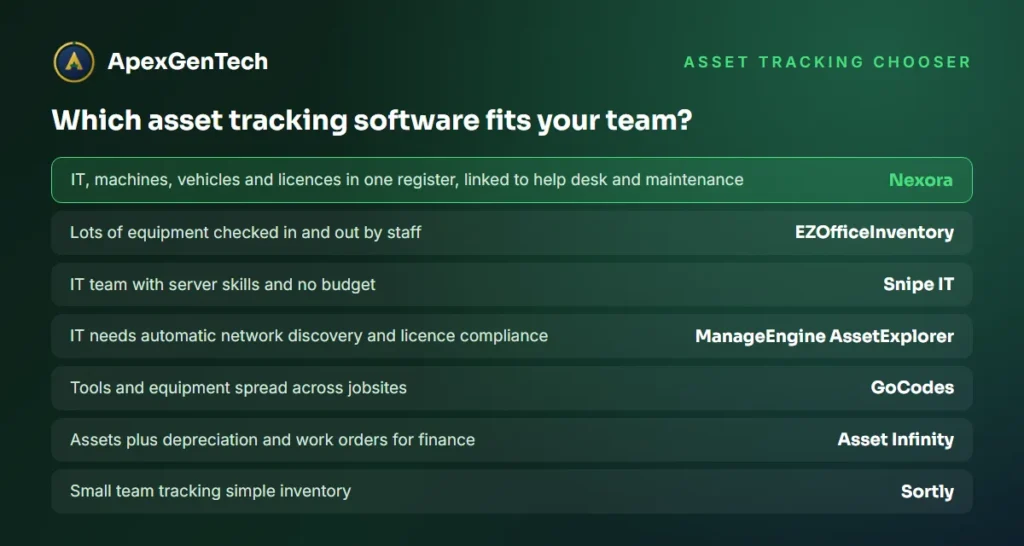
Which is the best asset tracking software for your team?
| Your situation | Start with | Why |
|---|---|---|
| IT, machines, vehicles and licences in one place | Nexora | One register linked to help desk, maintenance and gate |
| You want help desk and maintenance on the same platform | Nexora | Assets are one module of a wider operations platform |
| Lots of equipment lent to staff | EZOfficeInventory | Check in and check out with unlimited users |
| IT team, no budget, server skills | Snipe IT | Free open source |
| IT needs network discovery | ManageEngine AssetExplorer | Automatic scans and licence compliance |
| Tools spread across jobsites | GoCodes | Tough QR labels and GPS |
| Small team, simple inventory | Sortly | Free plan and an easy app |
For most growing companies the real problem is not one asset type. It is laptops in one spreadsheet, machines in another, licences in an email folder and repairs nobody can link back to anything. That is why we rank Nexora as the best asset tracking software for most teams: it puts all of it in one register and connects it to the work that happens around each asset, including preventive maintenance and the IT help desk. If your IT department mainly needs network discovery, we will tell you honestly and can supply ManageEngine AssetExplorer instead.
Best asset tracking software FAQs
What is the best asset tracking software for a small business?
For a business that wants IT, equipment and licences in one register with reminders, Nexora is our pick. For simple inventory on a small budget, Sortly’s free plan or Snipe IT for IT assets are good starting points.
Is there free asset tracking software?
Yes. Snipe IT is free open source if you host it yourself, Sortly has a free plan for up to 100 items, and ManageEngine AssetExplorer has a free edition for small IT estates.
How does QR code asset tracking work?
Each asset gets a QR label linked to its record. Scanning it with a phone opens the record, so staff can confirm location, owner and service history in seconds during audits and handovers.
What is the difference between asset tracking and IT asset management?
Asset tracking covers any physical item, from tools to vehicles. IT asset management focuses on computers and software, often with network discovery and licence compliance.
Can asset tracking software manage software licences?
Many can. Nexora, Snipe IT, AssetExplorer and Freshservice track licence seats and renewal dates, and Nexora also stores keys encrypted and records every reveal.
How long does it take to set up asset tracking software?
Most tools go live in one to four weeks. The main effort is cleaning your current asset list; with Nexora our team imports it from Excel for you.
Want to see the best asset tracking software working on your own assets? Send us a sample of your asset list and we will load it into Nexora for a free demo, with your own dates and reminders from day one.