The best ticketing system is the one your whole team actually uses: requests go in one place, reach the right person, escalate when they stall, and leave a record managers can report on. Picking one is harder than it sounds, because every vendor promises the same things and the real differences hide in pricing tiers, add ons and setup effort.
We compared 12 popular tools for IT and internal service teams, with clear pros and cons for each, a comparison table and a simple way to decide. Our pick for most companies is Nexora Help Desk, because it gives IT, HR, facilities and every other department its own help desk on one system, linked to assets and maintenance. A note on fairness: ApexGenTech builds Nexora and is also an authorised reseller of ManageEngine, so we have an interest. We have kept the pros and cons honest, including Nexora’s own limits, so you can judge for yourself.
What is a ticketing system?
A ticketing system turns every request, whether it arrives by email, form, portal or phone, into a ticket with a reference number, an owner, a priority and a status. The ticket moves through a lifecycle such as new, assigned, in progress and closed, and every comment and change is recorded. That gives the requester a way to follow progress and gives managers numbers on volume, response times and recurring problems.
There are three broad kinds:
- IT ticketing system or help desk: handles internal requests such as password resets, broken laptops and access requests.
- ITSM suite: adds formal incident, problem, change and asset management, usually following ITIL, for larger IT departments.
- Customer support help desk software: handles questions from customers across email, chat, social and phone.
Many companies need the first kind for IT and then discover that HR, facilities, finance and maintenance need the same thing. That is where the choice of the best ticketing system matters most.
How we chose the best ticketing system for each need
We scored each tool against seven questions that decide whether a ticketing system gets used or bypassed:
- Speed of logging: can someone raise a request in under a minute, by email or form?
- Routing and escalation: does work reach the right team and move up automatically when it stalls?
- Departments beyond IT: can HR, facilities and finance run their own queues?
- Assets and context: can a ticket link to the laptop, machine or vehicle it is about?
- Reporting: can a manager see open work, escalations and recurring problems?
- Total cost: licences, add ons, setup and admin time over three years, not just the entry price.
- Setup and support: how long until it is live, and who helps when something goes wrong?
Vendors change prices and plan names often, so we describe each pricing model rather than quoting figures that may be out of date. Always confirm current prices on the vendor’s own site before you buy.
Best ticketing system comparison table
| Tool | Best for | Type | Free option | Pricing model |
|---|---|---|---|---|
| Nexora Help Desk | One help desk for every department, linked to assets | Help desk inside an operations platform | Free demo on your own setup | Quote per company, monthly or annual |
| Freshservice | Mid market IT teams wanting fast cloud ITSM | ITSM | Free trial | Per agent tiers, AI on higher plans |
| Jira Service Management | Teams already using Jira | ITSM | Free plan for up to 3 agents | Per agent tiers |
| ManageEngine ServiceDesk Plus | Budget ITSM, cloud or on premises | ITSM | Free edition for small teams | Per technician editions |
| Zendesk | Customer facing omnichannel support | Customer support | Free trial | Per agent suites plus add ons |
| Freshdesk | Small customer support teams | Customer support | Free plan for small teams | Per agent tiers |
| Zoho Desk | Low budgets and Zoho users | Customer support | Free plan for up to 3 agents | Low per agent tiers |
| HaloITSM | ITIL focused teams wanting one licence | ITSM | Free trial | All inclusive per agent licence |
| ServiceNow ITSM | Large enterprises | Enterprise ITSM | Demo only | Quote only, premium |
| Help Scout | Email first support for small teams | Shared inbox | Free trial | Per user tiers |
| osTicket | Zero budget teams with Linux skills | Open source | Free, self hosted | Free or paid hosting |
| Zammad | Open source with a modern interface | Open source | Free, self hosted | Free or paid hosting |
The 12 best ticketing systems in 2026
1. Nexora Help Desk: best ticketing system overall for most companies
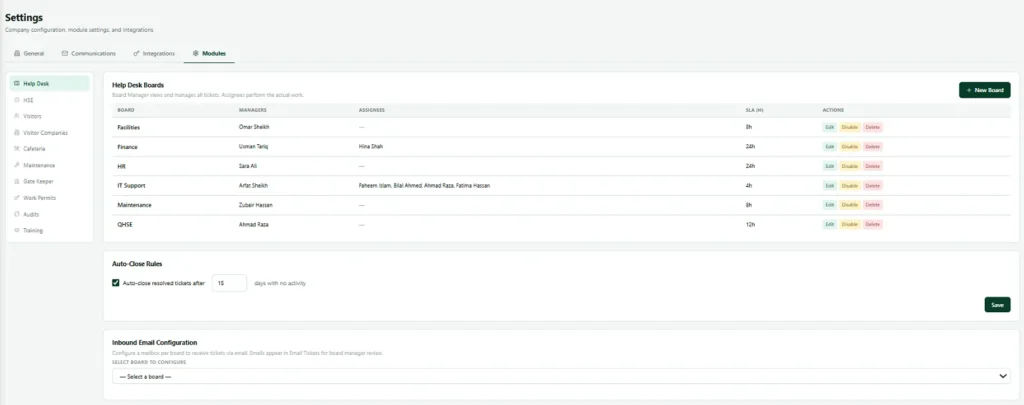
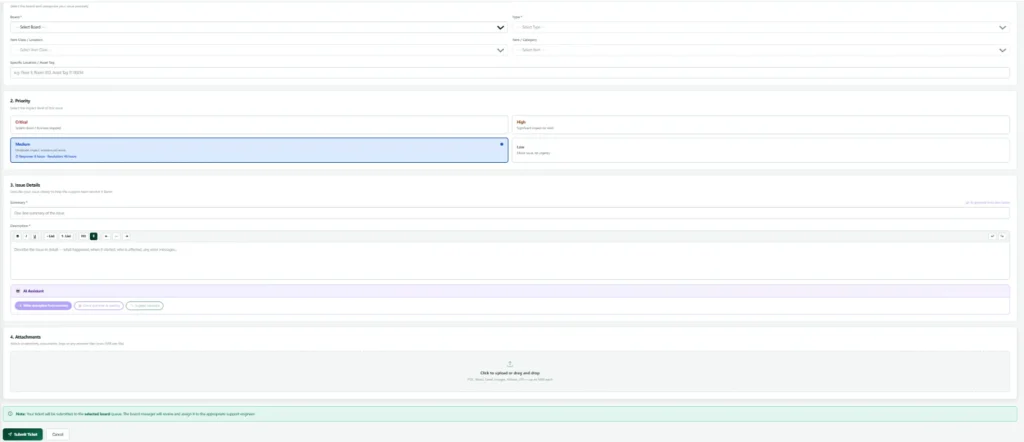
Nexora Help Desk is the help desk module of the Nexora business operations platform. Instead of one queue for IT, every department gets its own board: IT Support, HR, Facilities, Finance, Maintenance, QHSE or any team you add. Anyone in the company can raise a request on any board, so people never have to guess which team owns a problem before they are allowed to ask.
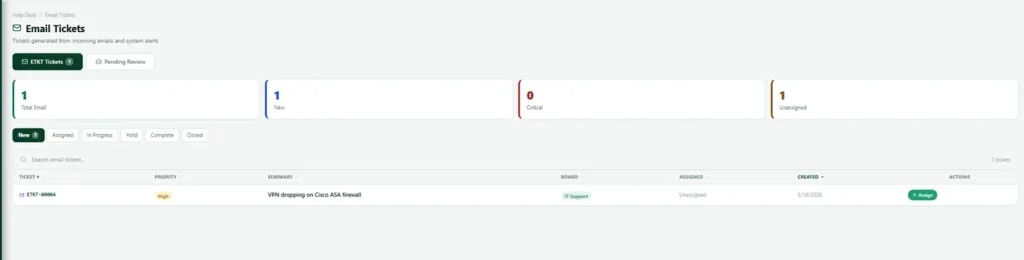
Each ticket carries a reference number plus a category, type, class, item and priority, which makes reporting meaningful instead of a wall of free text. Escalation ladders run per board in the background and move stalled tickets up the chain without anyone chasing. A board can have its own mailbox, so a shared inbox becomes a ticketing system, with a review step that keeps newsletters and noise out of the queue. Closing or reopening a ticket requires a written reason, so the history still makes sense months later.
The biggest difference is context. Tickets link to the asset register, so a technician sees the exact laptop or machine and its history, and the asset page shows how many tickets it has generated. The same platform runs maintenance, fleet, visitors, gate passes, permits and training, so you can add modules later without changing systems.
Pros
- One help desk for every department, each with its own board, members and escalation.
- Escalation that runs by itself and never sends the same warning twice.
- Email to ticket with a review step, plus routing from the subject line.
- Structured ticket fields that make reports useful from day one.
- Tickets linked to assets, maintenance and fleet on the same platform.
- Strict access: people see only their own tickets, their assigned work and their boards.
- Setup, data import and training done for you by our team, with support across Canada, the UK, the Gulf and Pakistan.
Cons
- No public price list; you get a written quote based on users, sites and modules.
- No permanent free plan, although demos run on your own departments and request types.
- Not a full ITIL suite: there is no formal change, problem or release management or CMDB.
- Built for internal service teams, not customer facing live chat or social channels.
- A younger product with a smaller public review base than the big names.
Best for: growing companies that want IT, HR, facilities and operations requests in one place, linked to their assets. See Nexora IT help desk software for screens and features.
2. Freshservice: best for mid market IT teams
Freshservice from Freshworks is a cloud ITSM tool that covers incidents, service requests, assets, changes and a self service portal. It is quick to roll out and well liked by IT practitioners.
Pros
- Modern interface and fast setup for a full ITSM tool.
- Asset management and service catalogue included.
- Large marketplace of integrations and a solid API.
Cons
- The Freddy AI features sit on higher tiers or cost extra.
- Per agent pricing adds up as the team grows.
- Cloud only, and mainly designed around the IT team.
Best for: IT departments of 10 to 100 agents that want ITIL style processes without a long project.
3. Jira Service Management: best for teams already on Atlassian
Atlassian’s service desk links support requests directly to development work in Jira, which makes it popular with software companies and IT teams that work closely with engineers.
Pros
- Free plan for up to three agents.
- Tickets link straight to Jira issues and Confluence knowledge articles.
- Strong incident and change management for technical teams.
Cons
- Steep learning curve for people outside Atlassian tools.
- Advanced features and AI sit on the more expensive tiers.
- Feels technical for HR, facilities or finance requesters.
Best for: engineering led companies that already live in Jira.
4. ManageEngine ServiceDesk Plus: best budget ITSM
ServiceDesk Plus offers incident, problem, change and asset management at a lower entry cost than most full ITSM tools, and it can run in the cloud or on your own servers. We are an authorised reseller, and our ManageEngine licensing page explains the editions.
Pros
- Full ITSM features at a lower price than most rivals.
- Cloud or on premises deployment, useful for data residency rules.
- Free edition for very small IT teams.
Cons
- Interface feels dated compared with newer tools.
- ITIL modules are split across editions, so check what you need.
- Setting up workflows well takes some admin effort.
Best for: IT teams that need real ITIL processes on a tight budget, or must host on premises.
5. Zendesk: best for customer facing omnichannel support
Zendesk is one of the best known names in customer service. It brings email, chat, voice and social into one agent workspace with strong automation and reporting.
Pros
- Excellent omnichannel support for customer facing teams.
- Deep automation, SLA rules and analytics.
- Huge app marketplace.
Cons
- Add ons for AI, voice and workforce management can raise the real cost well above the headline price.
- No native CMDB or change management for IT.
- Often needs a dedicated administrator.
Best for: customer service teams handling high volumes across many channels.
6. Freshdesk: best value for small support teams
Freshdesk is the customer support sibling of Freshservice, known for quick setup and good value.
Pros
- Free plan for small teams and low cost paid tiers.
- Easy to learn, with multichannel support out of the box.
- Useful automations such as predictive assignment.
Cons
- Limits start to show with very large teams.
- Deep customisation often needs developers.
- Built for customers, not internal IT or facilities work.
Best for: small and midsize businesses supporting customers by email and chat.
7. Zoho Desk: best low cost option
Zoho Desk has one of the lowest entry prices of any paid help desk and fits naturally if you already use Zoho CRM or Zoho One.
Pros
- Free plan for up to three agents.
- Low cost paid tiers with a visual workflow builder.
- Good mobile app and Zoho integrations.
Cons
- No ITSM modules such as change management or CMDB.
- Reporting is fairly basic on lower tiers.
- Advanced customisation can need scripting.
Best for: startups and Zoho users on a tight budget.
8. HaloITSM: best for ITIL focused teams
HaloITSM is a full ITSM platform with strong ITIL alignment and an all inclusive licence, so you do not buy modules separately.
Pros
- Very strong user ratings on review sites.
- All features, including AI, in one licence.
- Deep ITIL processes for incident, problem and change.
Cons
- Higher per agent price than most tools here.
- A paid onboarding package is usually required.
- Needs a proper implementation project.
Best for: IT departments that follow ITIL closely and want everything in one licence.
9. ServiceNow ITSM: best for large enterprises
ServiceNow is the enterprise standard for IT service management and extends across HR, facilities and security operations.
Pros
- Handles very complex, multi department enterprise processes.
- Leader in analyst evaluations, with a large pool of certified admins.
- Powerful low code platform for custom workflows.
Cons
- Quote only and among the most expensive options.
- Implementations often take months and need a platform team.
- Far more than small and midsize companies need.
Best for: enterprises with thousands of staff and a dedicated platform team.
10. Help Scout: best email first help desk
Help Scout feels like a shared inbox rather than a ticketing system, which makes it pleasant for small teams that mainly work by email.
Pros
- Clean, friendly interface that needs almost no training.
- Built in knowledge base and in app help widget.
- Fast to set up.
Cons
- Lighter automation and reporting than ITSM tools.
- Limited channels beyond email and chat.
- Not designed for internal IT or asset tracking.
Best for: small teams that want personal, email based support.
11. osTicket: best free ticketing system to self host
osTicket is a long running open source ticketing system you install on your own server.
Pros
- Free, with no limits on agents or tickets.
- Full control over your data.
- Stable and simple once running.
Cons
- Dated interface and basic automation.
- No AI, asset management or ITIL modules.
- You handle hosting, backups and security patching yourself.
Best for: technical teams with no budget and time to maintain a server.
12. Zammad: best open source with a modern interface
Zammad is a newer open source help desk with a cleaner design than most free tools, available self hosted or as a hosted service.
Pros
- Free to self host, with affordable hosted plans.
- Modern interface and multichannel ticketing.
- Roles, permissions and skill based routing.
Cons
- Self hosting needs technical skills.
- Smaller ecosystem and limited commercial support.
- Fewer advanced features than paid platforms.
Best for: teams that want open source and full data control without an old fashioned interface.
Free ticketing system options compared
A free ticketing system is a sensible start for very small teams, but check the limits before you commit:
- Agent caps: Jira Service Management and Zoho Desk allow up to three agents on their free plans.
- Feature caps: free tiers usually leave out automation, SLAs, custom fields and detailed reports.
- Hidden costs: open source tools such as osTicket and Zammad are free to download, but someone has to host, back up and patch them.
- Migration later: moving tickets out of a free tool when you outgrow it can take real effort.
If you expect to grow past a handful of agents or add other departments, it is usually cheaper to start on the system you will keep.
What to look for in an IT ticketing system
- Multiple intake channels: email, web form and portal at minimum, so nobody falls back to group chats.
- Automatic routing and escalation: tickets should reach the right team and escalate without manual chasing.
- SLA tracking: response and resolution targets by priority, with reports on how often you meet them.
- Asset links: knowing which device or machine a ticket concerns cuts diagnosis time.
- Access control: HR and finance tickets must stay private to the right people.
- Useful reports: open work per team, escalations, reopened tickets and recurring categories.
- Room to grow: the ability to add departments and modules without switching tools.
Best ticketing system for enterprise teams
An IT director at a company with 1,000 to 5,000 staff usually has the same three problems: too many tickets, too many disconnected tools, and pressure to show results from automation quickly. The best ticketing system for an enterprise is the one that cuts ticket volume, not just the one with the longest feature list.
- ServiceNow ITSM suits very large groups with a dedicated platform team and complex approval chains. It can model almost any process, but projects often run for months and need specialist staff.
- Jira Service Management fits enterprises whose engineering teams already live in Jira, because incidents and changes link straight to development work.
- Freshservice and HaloITSM give mid sized enterprises a full ITSM toolset with a faster rollout than ServiceNow.
- ManageEngine ServiceDesk Plus is the choice when the business needs an on premises ITSM option or tight cost control.
- Nexora Help Desk is our pick when the enterprise problem is wider than IT: HR, facilities, fleet and maintenance teams all get their own boards on one platform, linked to the assets they look after.
Whatever you choose, three things reduce ticket volume fastest in a large organisation: a self service portal with answers to the top 20 requests, automatic routing so nothing waits in a shared inbox, and reports that show which categories keep coming back so you can fix the cause. Ask every vendor to prove those three in a trial with your own data, and measure tickets per employee before and after so you can show the return within one quarter.
Help desk software with advanced reporting features
Reporting is where many teams discover the limits of their tool. Good help desk software should answer these questions in a few clicks, without exporting to a spreadsheet:
- How many tickets are open per team, and how old are they?
- What share of tickets met their response and resolution targets this month?
- Which categories, sites or assets create the most tickets?
- Which tickets were reopened, and who closed them?
- How does this month compare with the same month last year?
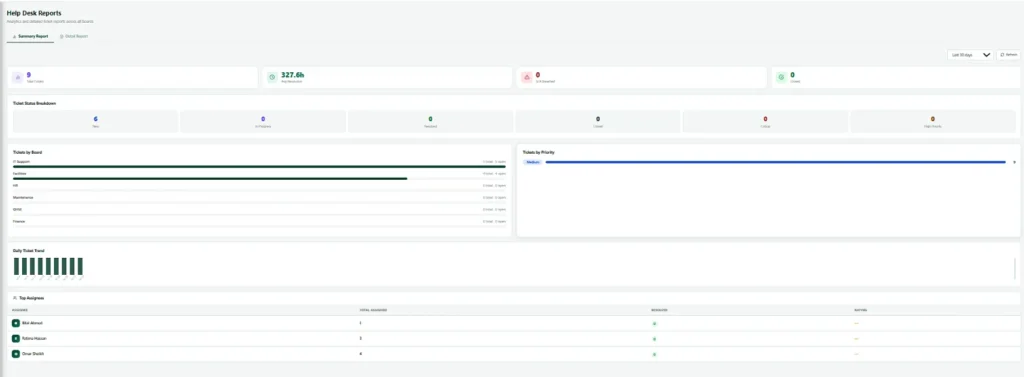
Among the tools above, ServiceNow, Freshservice, Zendesk and HaloITSM have the deepest built in reporting, with custom dashboards and scheduled reports. Jira Service Management reports well inside the Atlassian world. Nexora Help Desk includes dashboards per board and ties tickets to assets, so a manager can see which machine or laptop keeps failing, not just how many tickets arrived. Free tools such as osTicket offer only basic reports, which is often the first reason teams move off them.
Ticketing software cost: IT ticketing system pricing models
Prices change too often to quote here, but the way an IT ticketing system is priced decides what you really pay:
| Pricing model | Who uses it | Watch out for |
|---|---|---|
| Per agent per month | Freshservice, Freshdesk, Zendesk, Zoho Desk, Jira Service Management, Help Scout | Every person who answers tickets needs a paid seat; AI and asset features often sit on higher tiers |
| Per technician with editions | ManageEngine ServiceDesk Plus, HaloITSM | Asset counts and add on modules can change the price |
| Custom quote | ServiceNow, Nexora | Ask for a written quote that covers setup, training and support, not just licences |
| Free and self hosted | osTicket, Zammad | Server, backups, security patches and admin time are your cost |
Within any pricing model, the same things push ticketing software pricing up or down: how many agents answer tickets, how many departments share the system, whether you need asset management, single sign on or AI features, how much history must be moved from your old tool, and the support level you expect from the vendor.
To compare fairly, add up three years of licences, add ons, setup and the hours your own staff will spend running the tool. A cheaper ticketing system that nobody uses costs more than a dearer one that works.
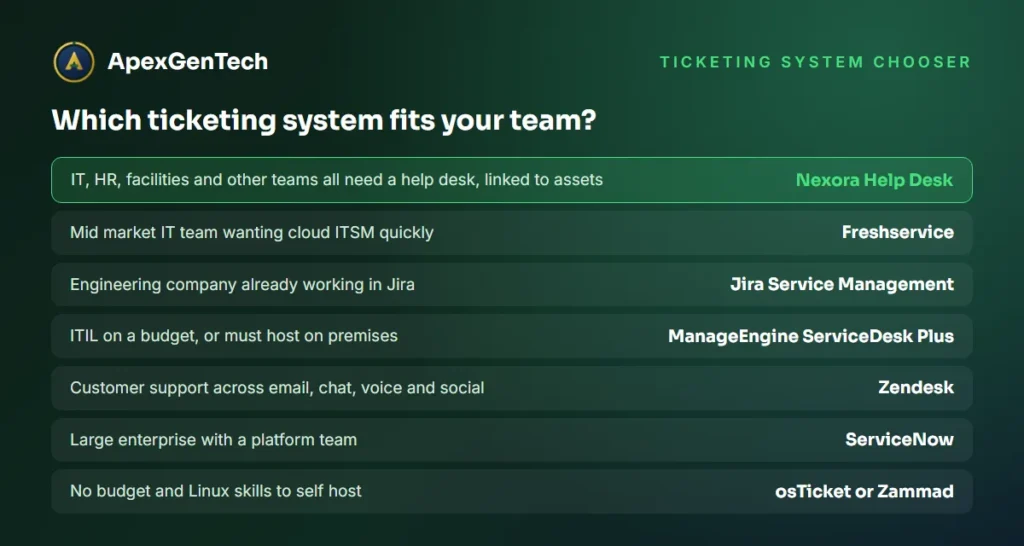
Which is the best ticketing system for your team?
| Your situation | Start with | Why |
|---|---|---|
| IT plus HR, facilities and other teams need queues | Nexora Help Desk | One system, a board per department, linked to assets |
| You also want assets, maintenance or fleet on the same platform | Nexora Help Desk | Help desk is one module of a wider operations platform |
| Mid market IT team wanting ITSM fast | Freshservice | Modern cloud ITSM with quick rollout |
| Engineering company on Jira | Jira Service Management | Tickets link straight to development work |
| ITIL on a budget or on premises | ManageEngine ServiceDesk Plus | Full ITSM at a lower cost, cloud or on premises |
| Customer support across many channels | Zendesk | Strongest omnichannel agent workspace |
| Large enterprise with a platform team | ServiceNow | Handles the most complex processes |
| No budget and Linux skills | osTicket or Zammad | Free and self hosted |
For most growing companies the real problem is not IT alone. It is requests scattered across email, phone and chat in every department. That is why we rank Nexora Help Desk as the best ticketing system for most teams: it fixes the whole company’s request handling, not just the IT queue. If your IT department needs deep ITIL change management, we will tell you honestly and can supply ManageEngine ServiceDesk Plus instead.
How to switch ticketing systems without losing history
- Export open tickets and the last year of closed tickets from your current tool or mailbox.
- Agree categories and priorities first, so imported tickets land in the right place.
- Start with one board, usually IT, and run it for two weeks.
- Point your shared mailbox at the new board on a fixed date.
- Add the next department once the first is running smoothly.
Our guide to moving off spreadsheets explains the same step by step approach for other records.
Best ticketing system FAQs
What is the best ticketing system for a small business?
For internal requests across several departments, Nexora Help Desk is our pick because one system covers IT, HR and facilities. For customer support only, Freshdesk or Zoho Desk are good low cost choices.
Is there a free ticketing system?
Yes. Jira Service Management and Zoho Desk have free plans for up to three agents, and osTicket and Zammad are free open source tools you host yourself.
What is the difference between a help desk and ITSM?
A help desk receives, routes and tracks requests to a close. ITSM adds formal problem, change and asset management processes, usually following ITIL, for larger IT departments.
Can one ticketing system serve IT, HR and facilities?
Yes, if it supports separate queues with their own members and privacy. Nexora gives each department its own board, and people only see tickets that concern them.
How much does a ticketing system cost?
Most tools charge per agent per month, with free plans for very small teams and quote only pricing for enterprise platforms. Add the cost of add ons, setup and admin time when you compare.
What is the best ticketing system for enterprise companies?
ServiceNow suits the largest groups with a platform team, Jira Service Management suits engineering led companies, and Freshservice or HaloITSM suit mid sized enterprises. If HR, facilities and maintenance need queues too, Nexora Help Desk covers every department on one platform.
Which help desk software has the best reporting?
ServiceNow, Freshservice, Zendesk and HaloITSM offer the deepest built in dashboards. Nexora Help Desk links tickets to assets, so reports show which equipment causes repeat problems as well as volumes and response times.
Does Microsoft have a ticketing system?
Microsoft sells Dynamics 365 Customer Service for customer support, but no simple internal IT help desk. Some teams build basic ones with Microsoft Lists, Forms and Power Automate, though a purpose built ticketing system is usually easier to run and report on.
Want to see the best ticketing system for your departments running on your own request types? Book a free Nexora Help Desk demo and we will set up boards for your IT, HR and facilities teams so you can try it with real examples.